REST Builder in Liferay 7.x

Introduction:
- Rest Builder is Liferay’s tool to build REST and GraphQL APIs.
- Rest builder is a tool that can help developers generate RESTful web services quickly and easily.
- REST Builder can be used to create RESTful web services for a wide range of applications, including web applications, mobile applications, and Iot devices.
Benefits :
The benefits of using REST Builder include:
Development speed:
- you avoid writing JAX-RS annotations, converters, adding support for multipart or layers to organize your code. Everything is generated.
API scaffolding:
- pagination, filtering, searching, JSON writers, XML generation, even unit, and integration tests are generated.
GraphQL support out of the box:
- write your REST API and get a GraphQL endpoint for free.
JSON & XML support:
- APIs return whichever format the consumer prefers.
Flexibility:
- REST Builder allows developers to customize the generated code to meet their specific needs.
Prerequisites :
- Liferay 7.x
- Basic understanding of Liferay
- Knowledge of API
Environmental Requirements :
- Liferay
- Eclipse IDE
- Blade CLI
- Gradle
Generating APIs with REST Builder
Follow these steps to REST Builder to create a headless REST API for your apps:
1. Create a project.
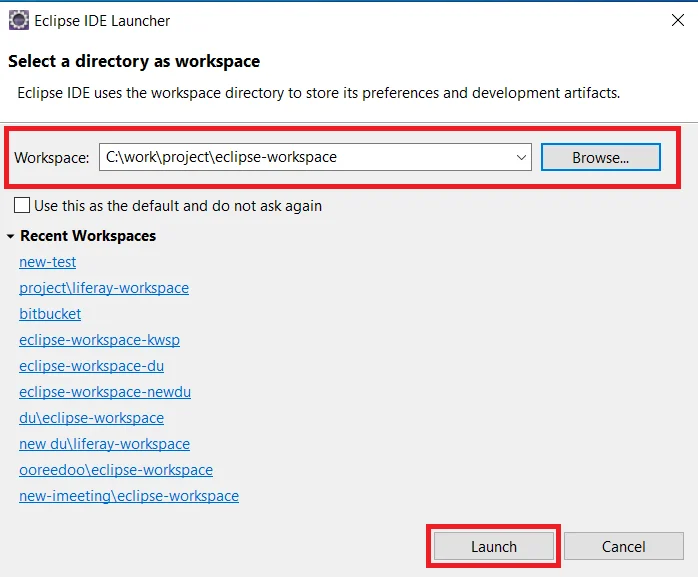
Open eclipse IDE. Select the desired workspace which is created for your project and then click on launch.
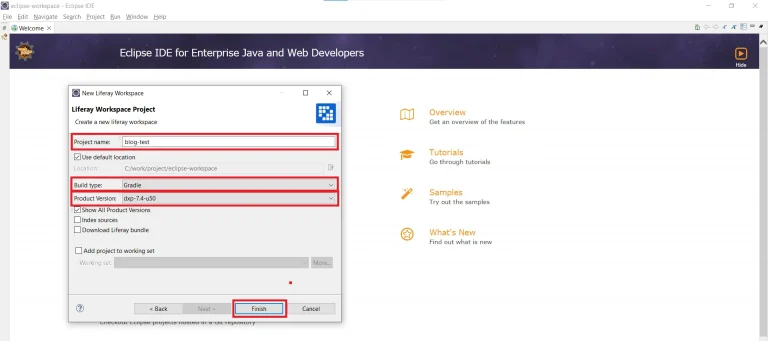
Navigate to the File → New → Other.. → Liferay Workspace Project → Enter Project name → Select Build type → Select Product Version → Then click on Finish tab. Open a new project window.
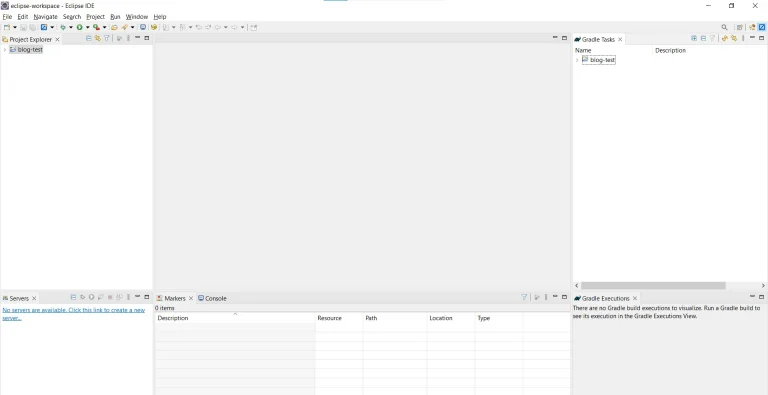
Now create a new REST Builder module project
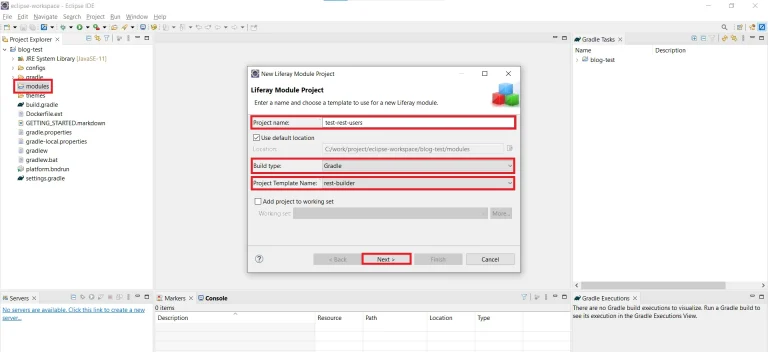
Navigate to the Project name → Right click on Modules → New → Liferay Module Project and Click on “Next”
Enter Project name
Select “Build type” as “Gradle” → Select “Project Template name” as “REST Builder” → Then click on “Next”
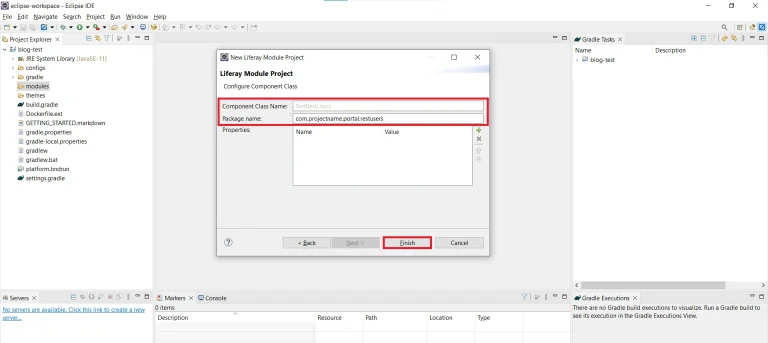
Open a new window. Enter Component class name → Enter Package name → Click on “Finish”
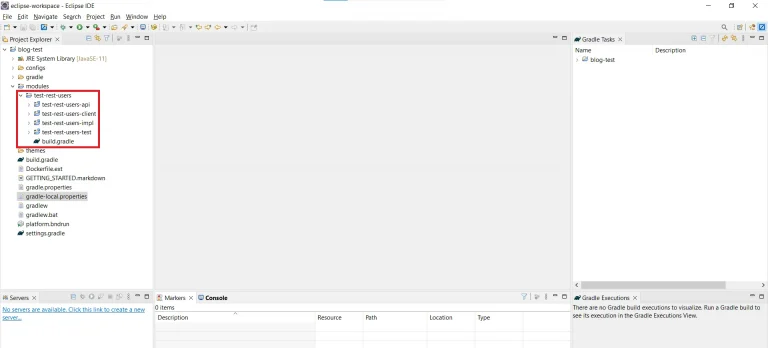
The necessary file structure for Rest Builder automatically gets created as below.
In your *-impl module’s root folder, write your OpenAPI profile in “rest-openapi.yaml” file.
Writing YAML files is tricky, so you can use the swagger editor to do it, which validates the YAML file against YAML syntax and the OpenAPI specification.
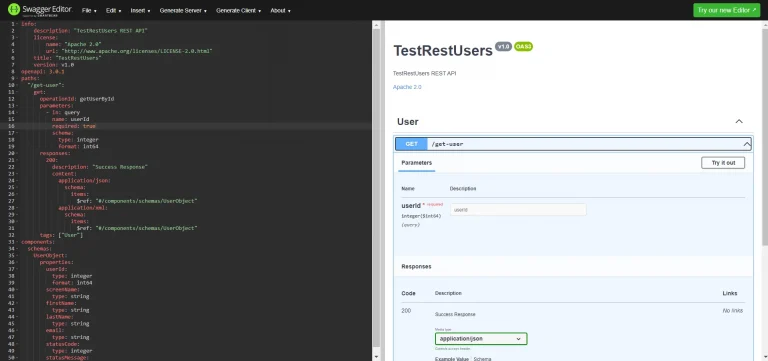
1// rest-openapi.yaml
2info:
3    description: "TestRestUsers REST API"
4    license:
5        name: "Apache 2.0"
6        url: "http://www.apache.org/licenses/LICENSE-2.0.html"
7    title: "TestRestUsers"
8    version: v1.0
9openapi: 3.0.1
10paths:
11  "/get-user":
12    get:
13      operationId: getUserById
14      parameters:
15        - in: query
16          name: userId
17          required: true
18          schema:
19            type: integer
20            format: int64
21      responses:
22        200:
23          description: "Success Response"
24          content:
25            application/json:
26              schema:
27                items:
28                  $ref: "#/components/schemas/UserObject"
29            application/xml:
30              schema:
31                items:
32                  $ref: "#/components/schemas/UserObject"
33      tags: ["User"]
34components:
35  schemas:
36    UserObject:
37      properties:
38        userId:
39          type: integer
40          format: int64
41        screenName:
42          type: string
43        firstName:
44          type: string
45        lastName:
46          type: string
47        email:
48          type: string
49        statusCode:
50          type: integer
51        statusMessage:
52          type: string
Once you have written your OpenAPI configuration and profile, it’s time to generate your scaffolding for REST and GraphQL.
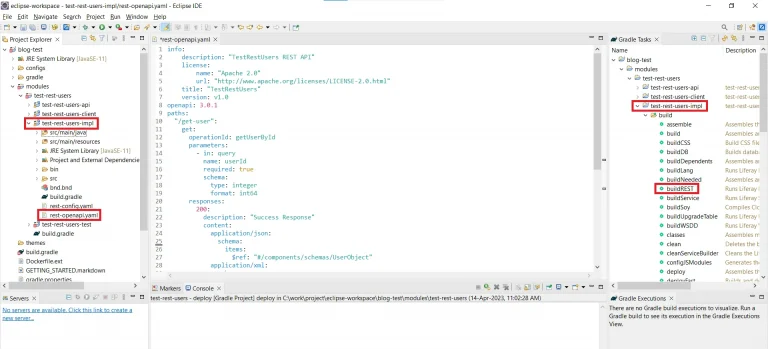
Now Build the REST Builder module.
In the terminal, navigate to the root directory of your rest-builder project
Execute the below command to build the rest-builder module
1blade gw buildRESTOr
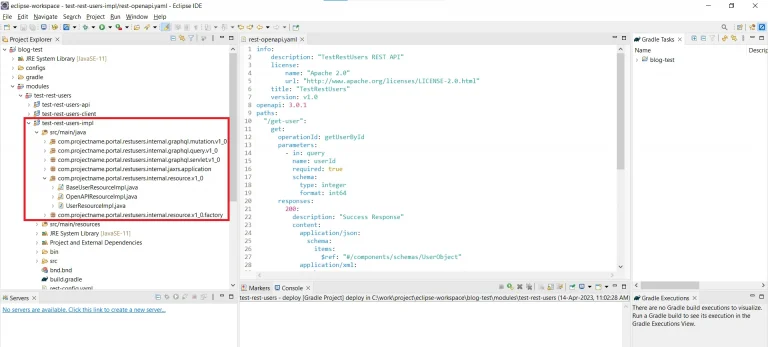
The necessary file structure for the rest-builder gets created as below.
It’s also generates the *ResourceImpl class where you can write your business logic for implementation of your each service.
After implementing all the business logic for each service, execute below command to deploy your rest-builder module
1blade gw deployOr
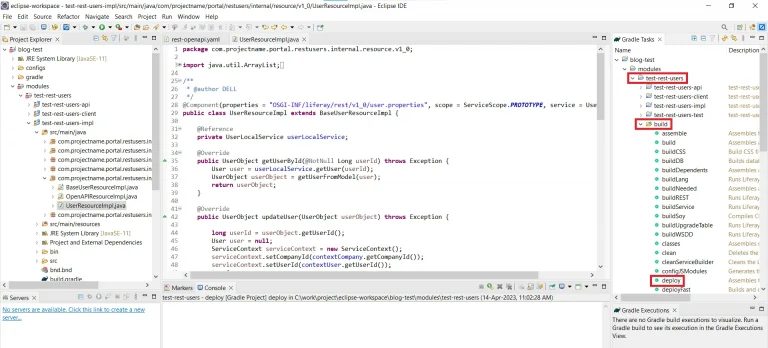
Now We have performed the CRUD operation for User in OpenAPI and implemented Business Logic for each service.
Write the OpenAPI profile for the user in “xxx-impl/rest-openapi.yaml” like as below:
1// rest-openapi.yaml
2info:
3    description: "TestRestUsers REST API"
4    license:
5        name: "Apache 2.0"
6        url: "http://www.apache.org/licenses/LICENSE-2.0.html"
7    title: "TestRestUsers"
8    version: v1.0
9openapi: 3.0.1
10paths:
11  "/get-user":
12    get:
13      operationId: getUserById
14      parameters:
15        - in: query
16          name: userId
17          required: true
18          schema:
19            type: integer
20            format: int64
21      responses:
22        200:
23          description: "Success Response"
24          content:
25            application/json:
26              schema:
27                $ref: "#/components/schemas/UserObject"
28            application/xml:
29              schema:
30                $ref: "#/components/schemas/UserObject"
31      tags: ["User"]
32  "/get-users":
33    get:
34      operationId: getUsers
35      parameters:
36        - in: query
37          name: page
38          schema:
39            type: integer
40        - in: query
41          name: pageSize
42          schema:
43            type: integer
44      responses:
45        200:
46          description: "Success Response"
47          content:
48            application/json:
49              schema:
50                items:
51                  $ref: "#/components/schemas/UserObject"
52            application/xml:
53              schema:
54                items:
55                  $ref: "#/components/schemas/UserObject"
56      tags: ["User"]
57  "/update-user":
58    post:
59      operationId: updateUser
60      requestBody:
61        content:
62          application/json:
63            schema:
64              $ref: "#/components/schemas/UserObject"
65          application/xml:
66            schema:
67              $ref: "#/components/schemas/UserObject"
68      responses:
69        200:
70          description: "Success Response"
71          content:
72            application/json:
73              schema:
74                $ref: "#/components/schemas/UserObject"
75            application/xml:
76              schema:
77                $ref: "#/components/schemas/UserObject"
78      tags: ["User"]
79  "/delete-user":
80    delete:
81      operationId: deleteUserById
82      parameters:
83        - in: query
84          name: userId
85          required: true
86          schema:
87            type: integer
88            format: int64
89      responses:
90        200:
91          description: "Success Response"
92          content:
93            application/json:
94              schema:
95                $ref: "#/components/schemas/UserObject"
96            application/xml:
97              schema:
98                $ref: "#/components/schemas/UserObject"
99      tags: ["User"]
100components:
101  schemas:
102    UserObject:
103      properties:
104        userId:
105          type: integer
106          format: int64
107        screenName:
108          type: string
109        firstName:
110          type: string
111        lastName:
112          type: string
113        email:
114          type: string
115        statusCode:
116          type: integer
117        statusMessage:
118          type: string
Your APIs are available at this URL:
1http://[host]:[port]/o/[APPLICATION_CLASSNAME]/[OPEN_API_VERSION]/In our case, the API is available at this URL:
1http://localhost:8080/o/apiBusiness Logic for the User:
Write a business logic in “xxx-impl/com.*.portal.restusers.internal.resource.v1_0” file.
1) Add OR Update User
First write the OpenAPI configuration profile to add or update a new User in “rest-openapi.yaml” file
1// rest-openapi.yaml
2paths:
3  "/update-user":
4    post:
5      operationId: updateUser
6      requestBody:
7        content:
8          application/json:
9            schema:
10              $ref: "#/components/schemas/UserObject"
11          application/xml:
12            schema:
13              $ref: "#/components/schemas/UserObject"
14      responses:
15        200:
16          description: "Success Response"
17          content:
18            application/json:
19              schema:
20                $ref: "#/components/schemas/UserObject"
21            application/xml:
22              schema:
23                $ref: "#/components/schemas/UserObject"
24      tags: ["User"]
25components:
26  schemas:
27    UserObject:
28      properties:
29        userId:
30          type: integer
31          format: int64
32        screenName:
33          type: string
34        firstName:
35          type: string
36        lastName:
37          type: string
38        email:
39          type: string
40        statusCode:
41          type: integer
42        statusMessage:
43          type: string
Write implementation logic for how to add or update User in “xxx-impl/com.*.portal.restusers.internal.resource.v1_0” file.
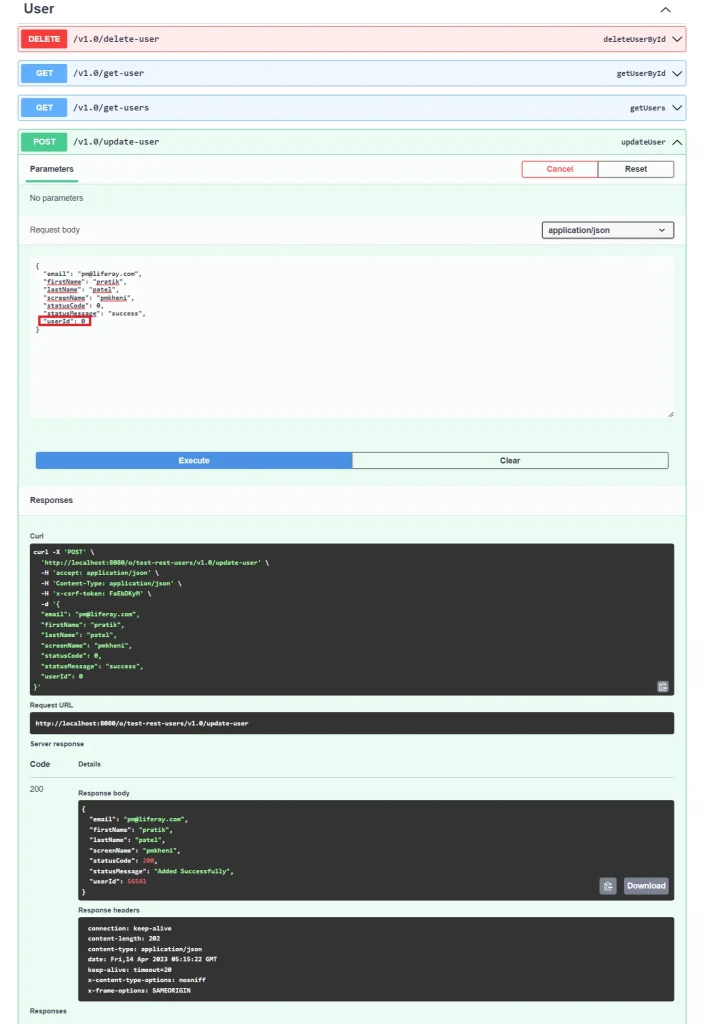
Note: If you have passed userId as 0, a new user is created.
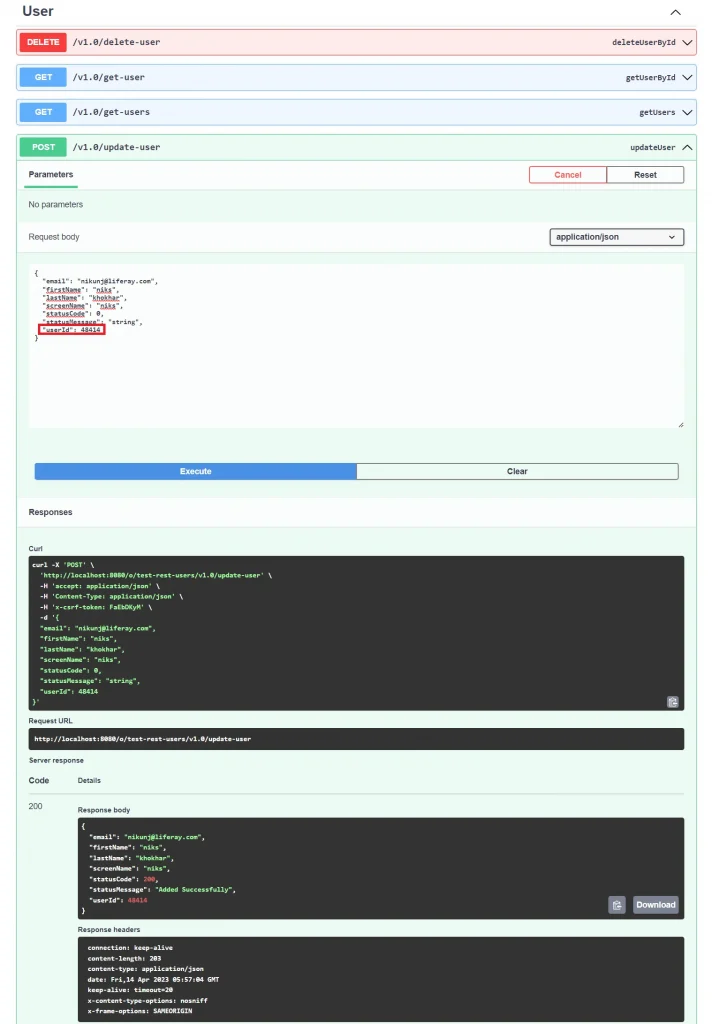
If you want to update an existing user then you can pass usedId of existing user for update existing user details.
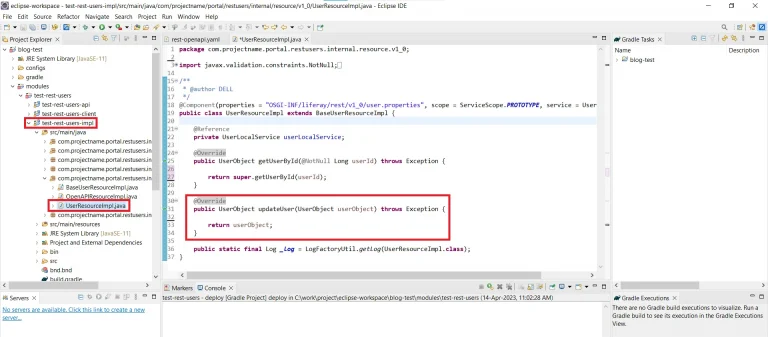
1// xxx-impl/com.*.portal.restusers.internal.resource.v1_0
2package com.projectname.portal.restusers.internal.resource.v1_0;
3
4import java.util.Locale;
5
6import javax.ws.rs.core.Response;
7
8import org.osgi.service.component.annotations.Component;
9import org.osgi.service.component.annotations.Reference;
10import org.osgi.service.component.annotations.ServiceScope;
11
12import com.liferay.petra.string.StringPool;
13import com.liferay.portal.kernel.log.Log;
14import com.liferay.portal.kernel.log.LogFactoryUtil;
15import com.liferay.portal.kernel.model.User;
16import com.liferay.portal.kernel.service.ServiceContext;
17import com.liferay.portal.kernel.service.UserLocalService;
18import com.liferay.portal.kernel.util.GetterUtil;
19import com.liferay.portal.kernel.util.Validator;
20import com.projectname.portal.restusers.dto.v1_0.UserObject;
21import com.projectname.portal.restusers.resource.v1_0.UserResource;
22
23/**
24 * @author DELL
25 */
26@Component(properties = "OSGI-INF/liferay/rest/v1_0/user.properties", scope = ServiceScope.PROTOTYPE, service = UserResource.class)
27public class UserResourceImpl extends BaseUserResourceImpl {
28
29	@Reference
30	private UserLocalService userLocalService;
31
32	@Override
33	public UserObject updateUser(UserObject userObject) throws Exception {
34
35		long userId = userObject.getUserId();
36		long companyId = contextCompany.getCompanyId();
37		Locale locale = contextAcceptLanguage.getPreferredLocale();
38		User user = null;
39		ServiceContext serviceContext = new ServiceContext();
40		serviceContext.setCompanyId(companyId);
41		serviceContext.setUserId(contextUser.getUserId());
42
43		String firstName = userObject.getFirstName();
44		String lastName = userObject.getLastName();
45		String screenName = userObject.getScreenName();
46		String primaryEmailAddress = userObject.getEmail();
47
48		try {
49			user = Validator.isNotNull(userId) ? userLocalService.updateUser(userId, StringPool.BLANK, StringPool.BLANK,
50					StringPool.BLANK, false, StringPool.BLANK, StringPool.BLANK, screenName, primaryEmailAddress, false,
51					null, StringPool.BLANK, StringPool.BLANK, StringPool.BLANK, StringPool.BLANK, firstName,
52					StringPool.BLANK, lastName, GetterUtil.DEFAULT_LONG, GetterUtil.DEFAULT_LONG, true, 10, 10, 1980,
53					StringPool.BLANK, StringPool.BLANK, StringPool.BLANK, StringPool.BLANK, StringPool.BLANK,
54					StringPool.BLANK, GetterUtil.DEFAULT_LONG_VALUES, GetterUtil.DEFAULT_LONG_VALUES,
55					GetterUtil.DEFAULT_LONG_VALUES, null, GetterUtil.DEFAULT_LONG_VALUES, serviceContext)
56					: userLocalService.addUser(contextUser.getUserId(), companyId, true, null, null, false, screenName,
57							primaryEmailAddress, locale, firstName, StringPool.BLANK, lastName, GetterUtil.DEFAULT_LONG,
58							GetterUtil.DEFAULT_LONG, true, 10, 10, 1980, StringPool.BLANK,
59							GetterUtil.DEFAULT_LONG_VALUES, GetterUtil.DEFAULT_LONG_VALUES,
60							GetterUtil.DEFAULT_LONG_VALUES, GetterUtil.DEFAULT_LONG_VALUES, true, serviceContext);
61
62			userId = user.getUserId();
63			userObject.setUserId(userId);
64			userObject.setStatusCode(Response.ok().build().getStatus());
65			userObject.setStatusMessage("Added Successfully");
66		} catch (Exception e) {
67			_log.error(e.getMessage(), e);
68			userObject.setStatusCode(Response.serverError().build().getStatus());
69			userObject.setStatusMessage(e.getMessage());
70		}
71
72		return userObject;
73	}
74
75	public static final Log _log = LogFactoryUtil.getLog(UserResourceImpl.class);
76}
Add User
Note: Here you have passed userId as 0 for add new user
Update User by userId
Note: Here you have passed the userId of the existing user.
2) Get User
First write the OpenAPI configuration profile to get User in “rest-openapi.yaml” file
1// rest-openapi.yaml
2paths:
3  "/get-user":
4    get:
5      operationId: getUserById
6      parameters:
7        - in: query
8          name: userId
9          required: true
10          schema:
11            type: integer
12            format: int64
13      responses:
14        200:
15          description: "Success Response"
16          content:
17            application/json:
18              schema:
19                $ref: "#/components/schemas/UserObject"
20            application/xml:
21              schema:
22                $ref: "#/components/schemas/UserObject"
23      tags: ["User"]
24components:
25  schemas:
26    UserObject:
27      properties:
28        userId:
29          type: integer
30          format: int64
31        screenName:
32          type: string
33        firstName:
34          type: string
35        lastName:
36          type: string
37        email:
38          type: string
39        statusCode:
40          type: integer
41        statusMessage:
42          type: string
Write Implementation logic for how to get User By UserId in “xxx-impl/com.*.portal.restusers.internal.resource.v1_0” file.
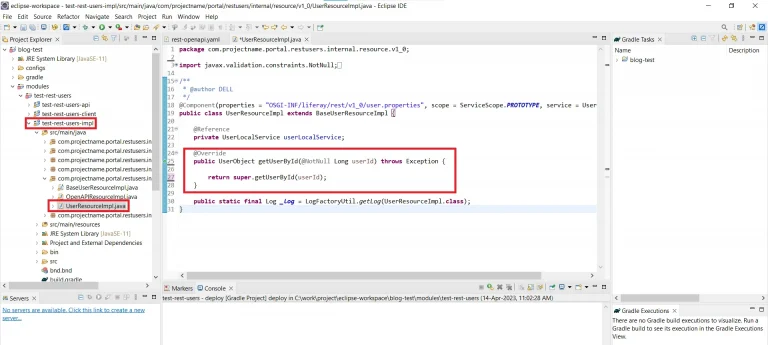
1// xxx-impl/com.*.portal.restusers.internal.resource.v1_0
2package com.projectname.portal.restusers.internal.resource.v1_0;
3
4import javax.validation.constraints.NotNull;
5
6import org.osgi.service.component.annotations.Component;
7import org.osgi.service.component.annotations.Reference;
8import org.osgi.service.component.annotations.ServiceScope;
9
10import com.liferay.portal.kernel.log.Log;
11import com.liferay.portal.kernel.log.LogFactoryUtil;
12import com.liferay.portal.kernel.model.User;
13import com.liferay.portal.kernel.service.UserLocalService;
14import com.projectname.portal.restusers.dto.v1_0.UserObject;
15import com.projectname.portal.restusers.resource.v1_0.UserResource;
16
17/**
18 * @author DELL
19 */
20@Component(properties = "OSGI-INF/liferay/rest/v1_0/user.properties", scope = ServiceScope.PROTOTYPE, service = UserResource.class)
21public class UserResourceImpl extends BaseUserResourceImpl {
22
23	@Reference
24	private UserLocalService userLocalService;
25
26	@Override
27	public UserObject getUserById(@NotNull Long userId) throws Exception {
28		User user = userLocalService.getUser(userId);
29		UserObject userObject = getUserFromModel(user);
30		return userObject;
31	}
32
33	private UserObject getUserFromModel(User user) {
34		UserObject userObject = new UserObject();
35		userObject.setScreenName(user.getScreenName());
36		userObject.setFirstName(user.getFirstName());
37		userObject.setLastName(user.getLastName());
38		userObject.setEmail(user.getEmailAddress());
39		return userObject;
40	}
41
42	public static final Log _log = LogFactoryUtil.getLog(UserResourceImpl.class);
43}
Get User By userId
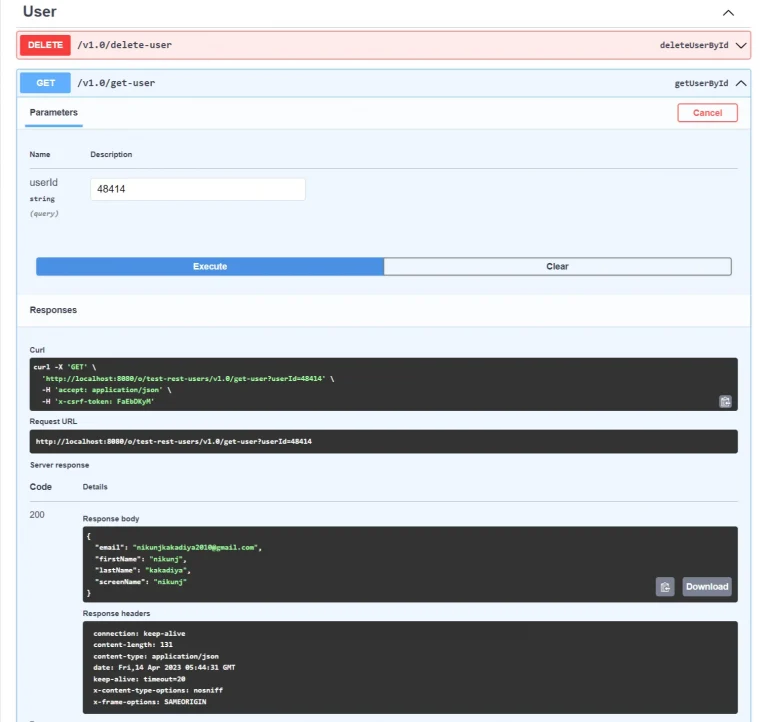
3) Delete User
First write the OpenAPI configuration profile to delete existing User in “rest-openapi.yaml” file
1// rest-openapi.yaml
2paths:
3  "/delete-user":
4    delete:
5      operationId: deleteUserById
6      parameters:
7        - in: query
8          name: userId
9          required: true
10          schema:
11            type: integer
12            format: int64
13      responses:
14        200:
15          description: "Success Response"
16          content:
17            application/json:
18              schema:
19                $ref: "#/components/schemas/UserObject"
20            application/xml:
21              schema:
22                $ref: "#/components/schemas/UserObject"
23      tags: ["User"]
24components:
25  schemas:
26    UserObject:
27      properties:
28        userId:
29          type: integer
30          format: int64
31        screenName:
32          type: string
33        firstName:
34          type: string
35        lastName:
36          type: string
37        email:
38          type: string
39        statusCode:
40          type: integer
41        statusMessage:
42          type: string
Write Implementation logic for how to delete User in “xxx-impl/com.*.portal.restusers.internal.resource.v1_0″ file.
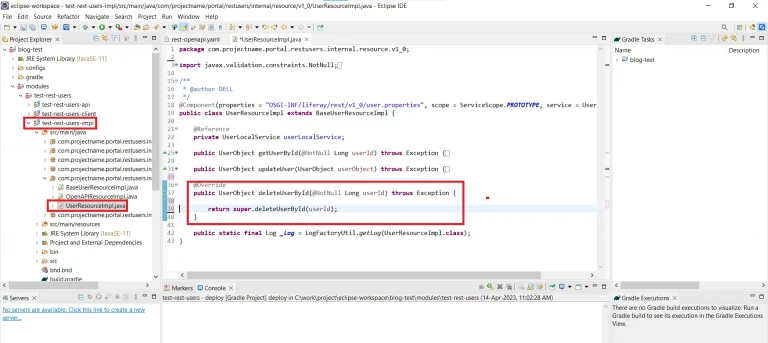
1// xxx-impl/com.*.portal.restusers.internal.resource.v1_0
2package com.projectname.portal.restusers.internal.resource.v1_0;
3
4import javax.validation.constraints.NotNull;
5
6import org.osgi.service.component.annotations.Component;
7import org.osgi.service.component.annotations.Reference;
8import org.osgi.service.component.annotations.ServiceScope;
9
10import com.liferay.portal.kernel.log.Log;
11import com.liferay.portal.kernel.log.LogFactoryUtil;
12import com.liferay.portal.kernel.service.UserLocalService;
13import com.projectname.portal.restusers.dto.v1_0.UserObject;
14import com.projectname.portal.restusers.resource.v1_0.UserResource;
15
16/**
17 * @author DELL
18 */
19@Component(properties = "OSGI-INF/liferay/rest/v1_0/user.properties", scope = ServiceScope.PROTOTYPE, service = UserResource.class)
20public class UserResourceImpl extends BaseUserResourceImpl {
21
22	@Reference
23	private UserLocalService userLocalService;
24
25	@Override
26	public UserObject deleteUserById(@NotNull Long userId) throws Exception {
27		UserObject userObject = new UserObject();
28		try {
29			userLocalService.deleteUser(userId);
30			userObject.setStatusCode(200);
31			userObject.setStatusMessage("Deleted Successfully");
32		} catch (Exception e) {
33			_log.error(e.getMessage(), e);
34			userObject.setStatusCode(500);
35			userObject.setStatusMessage(e.getMessage());
36		}
37		return userObject;
38	}
39
40	public static final Log _log = LogFactoryUtil.getLog(UserResourceImpl.class);
41}
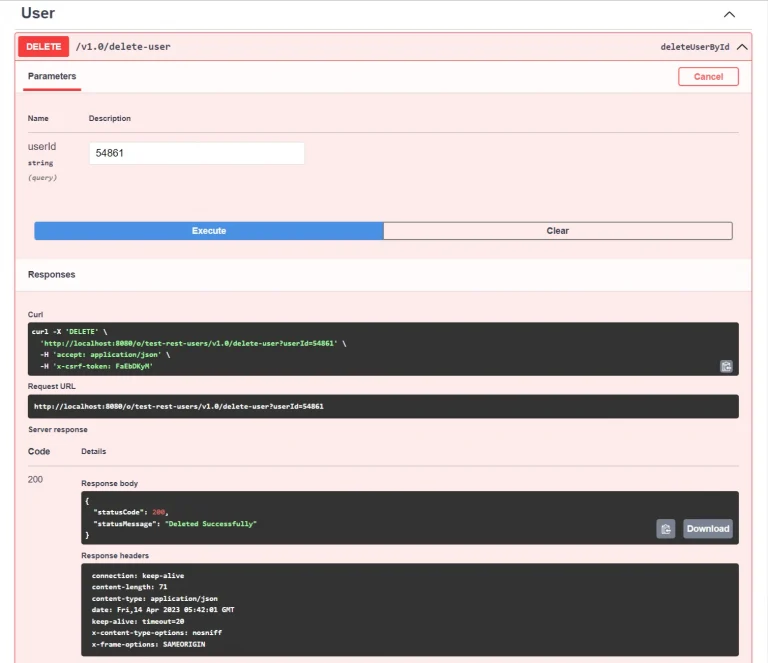
Delete User By userId
4) Get All Users
First write the OpenAPI configuration profile to get all Users in “rest-openapi.yaml” file
1// rest-openapi.yaml
2paths:
3  "/get-users":
4    get:
5      operationId: getUsers
6      parameters:
7        - in: query
8          name: page
9          schema:
10            type: integer
11        - in: query
12          name: pageSize
13          schema:
14            type: integer
15      responses:
16        200:
17          description: "Success Response"
18          content:
19            application/json:
20              schema:
21                items:
22                  $ref: "#/components/schemas/UserObject"
23            application/xml:
24              schema:
25                items:
26                  $ref: "#/components/schemas/UserObject"
27      tags: ["User"]
28components:
29  schemas:
30    UserObject:
31      properties:
32        userId:
33          type: integer
34          format: int64
35        screenName:
36          type: string
37        firstName:
38          type: string
39        lastName:
40          type: string
41        email:
42          type: string
43        statusCode:
44          type: integer
45        statusMessage:
46          type: string
Write Implementation logic for how to get all Users in “xxx-impl/com.*.portal.restusers.internal.resource.v1_0″ file.
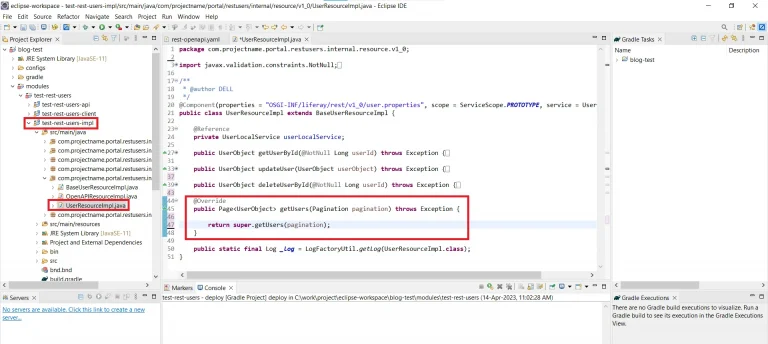
1// xxx-impl/com.*.portal.restusers.internal.resource.v1_0
2package com.projectname.portal.restusers.internal.resource.v1_0;
3
4import java.util.ArrayList;
5import java.util.List;
6
7import org.osgi.service.component.annotations.Component;
8import org.osgi.service.component.annotations.Reference;
9import org.osgi.service.component.annotations.ServiceScope;
10
11import com.liferay.portal.kernel.log.Log;
12import com.liferay.portal.kernel.log.LogFactoryUtil;
13import com.liferay.portal.kernel.model.User;
14import com.liferay.portal.kernel.service.UserLocalService;
15import com.liferay.portal.vulcan.pagination.Page;
16import com.liferay.portal.vulcan.pagination.Pagination;
17import com.projectname.portal.restusers.dto.v1_0.UserObject;
18import com.projectname.portal.restusers.resource.v1_0.UserResource;
19
20/**
21 * @author DELL
22 */
23@Component(properties = "OSGI-INF/liferay/rest/v1_0/user.properties", scope = ServiceScope.PROTOTYPE, service = UserResource.class)
24public class UserResourceImpl extends BaseUserResourceImpl {
25
26	@Reference
27	private UserLocalService userLocalService;
28
29	@Override
30	public Page getUsers(Pagination pagination) throws Exception {
31		List userObjects = new ArrayList<>();
32		List users = userLocalService.getUsers(pagination.getStartPosition(), pagination.getEndPosition());
33		for (User user : users) {
34			UserObject userObject = getUserFromModel(user);
35			userObjects.add(userObject);
36		}
37		return Page.of(userObjects, pagination, userObjects.size());
38	}
39
40	private UserObject getUserFromModel(User user) {
41		UserObject userObject = new UserObject();
42		userObject.setScreenName(user.getScreenName());
43		userObject.setFirstName(user.getFirstName());
44		userObject.setLastName(user.getLastName());
45		userObject.setEmail(user.getEmailAddress());
46		return userObject;
47	}
48
49	public static final Log _log = LogFactoryUtil.getLog(UserResourceImpl.class);
50}
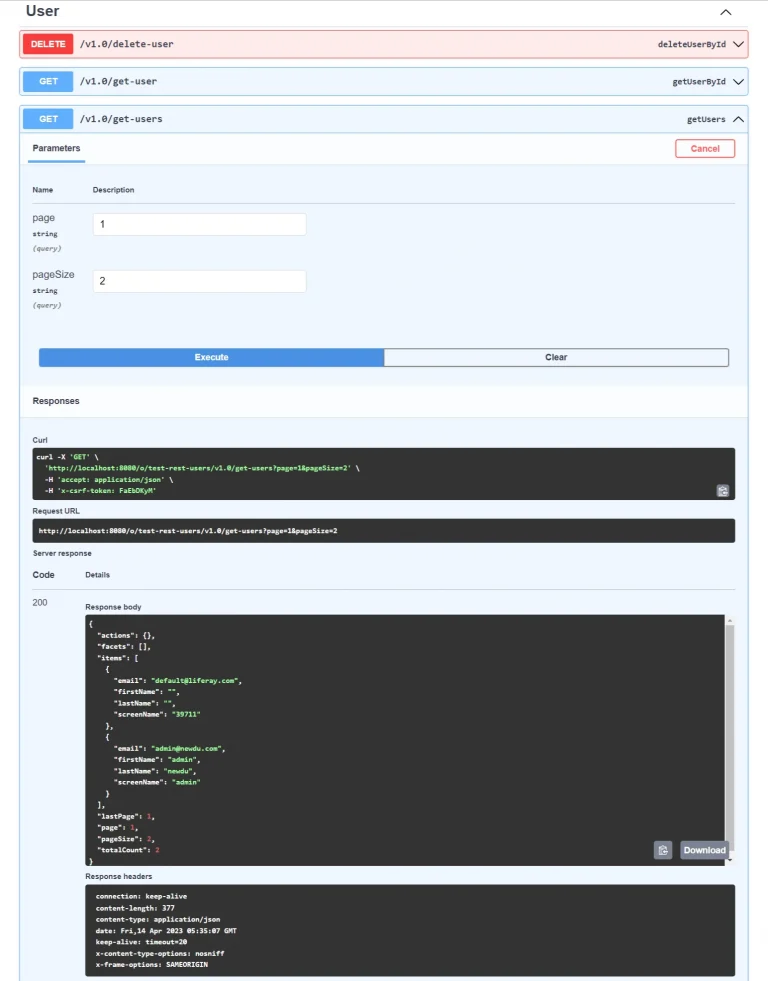
Get All Users
Note: Here you have passed page and page-size for getting users.