Model Document Contributor in Liferay

Introduction
A Model Document Contributor in Liferay is essential for enhancing the search capabilities by allowing custom data from entities (models) to be indexed and made searchable in Liferay’s search engine (Elasticsearch).
Prerequisites
- Liferay portal 7/7.x
- Elasticsearch
Use of Model Document Contributor in Liferay
- Out of the box, Liferay may not index all the fields of your custom entities. The Model Document Contributor allows you to define and include additional fields from your entities to be indexed, making them searchable.
- By contributing specific data to the search index, you can ensure that relevant fields are available for search queries. This enhances the accuracy and relevance of search results.
- It provides flexibility to control what data is indexed and how it is represented in the search index.
- When you have unique search requirements, such as custom filtering or sorting, the Model Document Contributor allows you to define how your custom model’s data should be indexed and retrieved.
- In summary, the Model Document Contributor plays a vital role in extending and customizing the search functionality in Liferay, ensuring that your data is discoverable and that search results are tailored to your specific needs.
Creating Model Document Contributor in Liferay
For demonstration purposes, I created the web content structure below with three fields: Event Name, Start Date, and End Date.
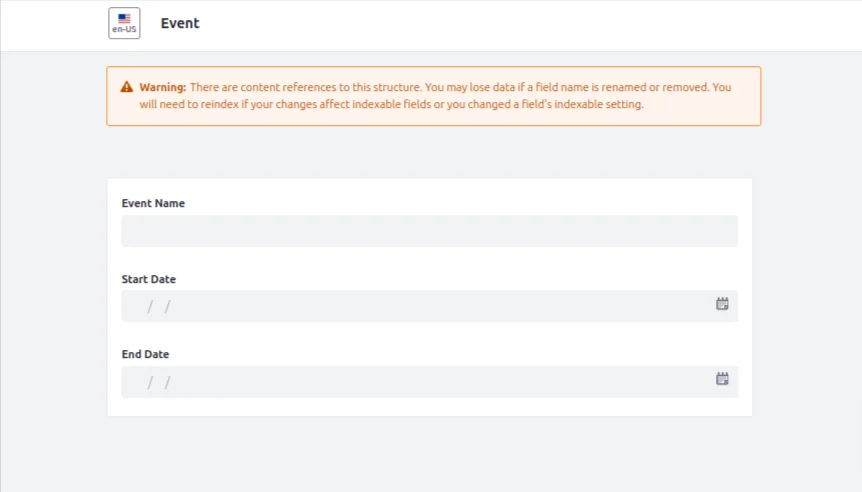
While creating web content with this structure, these three fields will not be indexed in Liferay’s search document by default. We will create a ModelDocumentContributor for the JournalArticle to index the Start Date in the document.
Please follow the below steps to create a model document contributor.
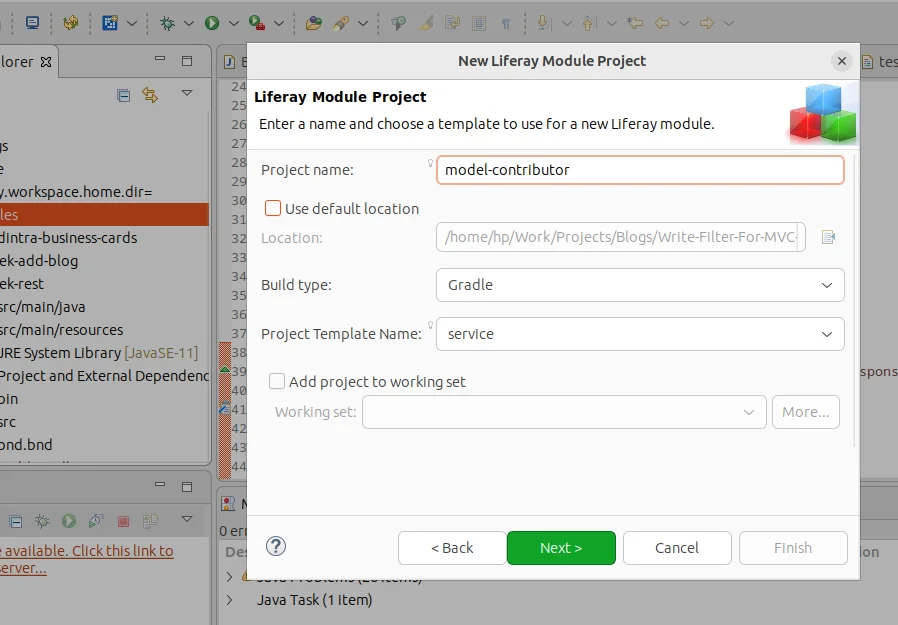
Step 1 : Create the service portlet.
- Open the Liferay workspace and create a new Liferay Module Project, and select ‘service’ in the Project Template Name.
- Provide the class name and package name and create the module.
Step 2 : Add ModelDocumetContributor to the service.
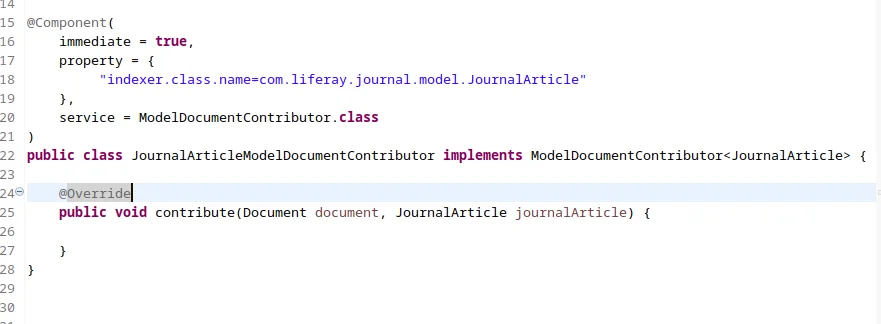
1. Add the below line in the Component property.
1indexer.class.name=com.liferay.journal.model.JournalArticle2. Provide service type as ‘ModelDocumentContributor.class’.
3. Implement ‘ModelDocumentContributor<JournalArticle>’, and include the unimplemented methods.
Step 3 : Write the code in the contribute method.
1package model.contributor;
2
3import com.liferay.journal.model.JournalArticle;
4import com.liferay.portal.kernel.log.Log;
5import com.liferay.portal.kernel.log.LogFactoryUtil;
6import com.liferay.portal.kernel.search.Document;
7import com.liferay.portal.kernel.search.Field;
8import com.liferay.portal.kernel.util.DateUtil;
9import com.liferay.portal.kernel.xml.SAXReaderUtil;
10import com.liferay.portal.search.spi.model.index.contributor.ModelDocumentContributor;
11import java.util.Date;
12import java.util.Locale;
13import org.osgi.service.component.annotations.Component;
14
15@Component(
16	immediate = true,
17	property = {
18		 "indexer.class.name=com.liferay.journal.model.JournalArticle"
19	},
20	service = ModelDocumentContributor.class
21)
22public class JournalArticleModelDocumentContributor implements ModelDocumentContributor<JournalArticle> {
23
24	private static final Log _log = LogFactoryUtil.getLog(JournalArticleModelDocumentContributor.class.getName());
25
26	@Override
27	public void contribute(Document document, JournalArticle journalArticle) {
28		_log.info("Indexing " + journalArticle.getTitle(journalArticle.getDefaultLanguageId()));
29		try {
30			if(journalArticle.getDDMStructure().getStructureKey().equalsIgnoreCase("EVENT")) {
31				com.liferay.portal.kernel.xml.Document saxDocument = SAXReaderUtil.read(journalArticle.getContent());
32				String startDateStr = saxDocument.valueOf("//dynamic-element[@name='Date12018025']/dynamic-content/text()");
33				try {
34                    Date startDate = DateUtil.parseDate("yyyy-MM-dd", startDateStr, new Locale(journalArticle.getDefaultLanguageId()));
35                    document.addDate("startDate", startDate);
36                    document.addDateSortable(Field.getSortableFieldName("startDate"), startDate);
37                    _log.info("Indexed startDate");
38                } catch (Exception e){
39                	 _log.error(e);
40                }
41			}
42		} catch (Exception e) {
43			e.printStackTrace();
44		}
45	}
46}
Explanation of the code
If the structure key of the JournalArticle is ‘EVENT’, the Start Date field will be fetched from the Journal Article and added to the document. When you deploy this service module, the Start Date field will be also indexed while creating the web content.
Note : we need to execute reindexing for existing content, Once indexed, we can directly use this custom field for searches.
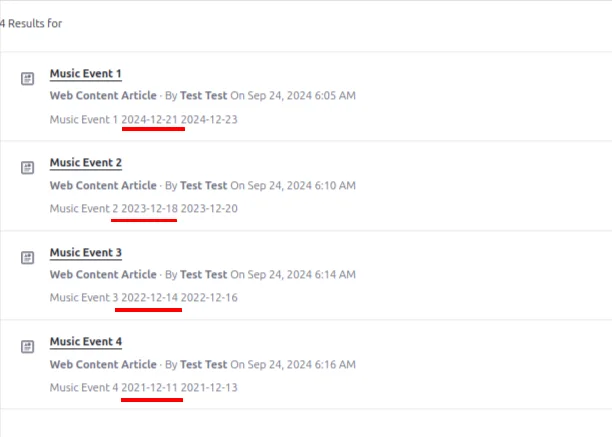
To use this indexed field, I have created a blueprint.
- In the query settings tab, I selected “Web Content Article” as the asset type.
- In the configuration tab, under sort configuration, I have applied sorting by the custom field ‘startDate’ in descending order.
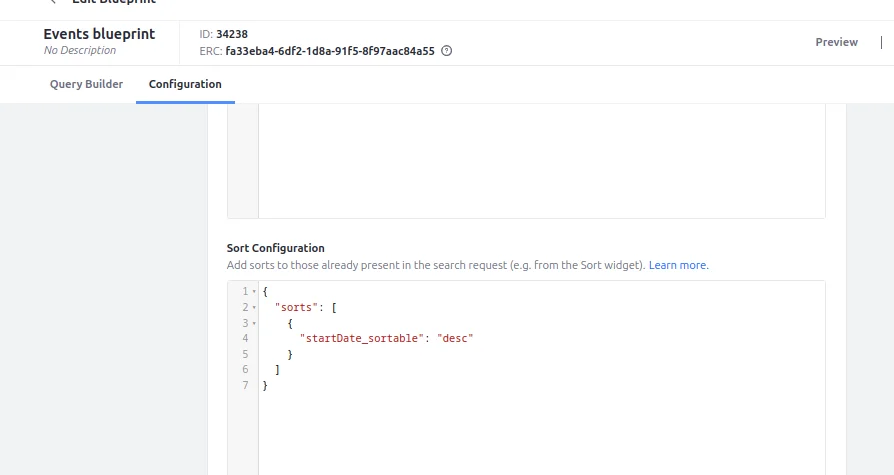
When I use this blueprint on the search results page, the (web contents of the event type structure will be displayed in descending order based on the start date.
Conclusion
Incorporating ModelDocumentContributor in Liferay provides a powerful way to customize how web content structure fields are indexed and searched. By leveraging this feature, you can enhance the search experience by including custom fields, such as dates or other metadata, in your search results. This not only improves the accuracy and relevance of search results but also allows for more flexible sorting and filtering options.


