Liferay
How To Override Liferay 7 Portal JavaScript ?

Bhargav Vaghasiya•Jun 19, 2020
Introduction
Liferay provides many ways to override its behavior. Sometimes we need to override javascript files like liferay session, liferay scheduler, liferay dynamic-data-mapping-web and so many. Follow below things, if you want to override javascript file.
- A copy of the original module’s javascript file containing your modifications.
- A config.js file that specifies the modified javascript file’s path and the module it overrides.
- A bnd.bnd file that tells the OSGi container to override the original.
Prerequisites :-
- Java
- Liferay portal 7/7.x
Environment Requirement :-
- JDK 8
- Eclipse
- Liferay Portal
Follow below step for override Liferay default JS:-
- Create an OSGi module to override the original file:-
- Go to Liferay workspace project >> modules >> new
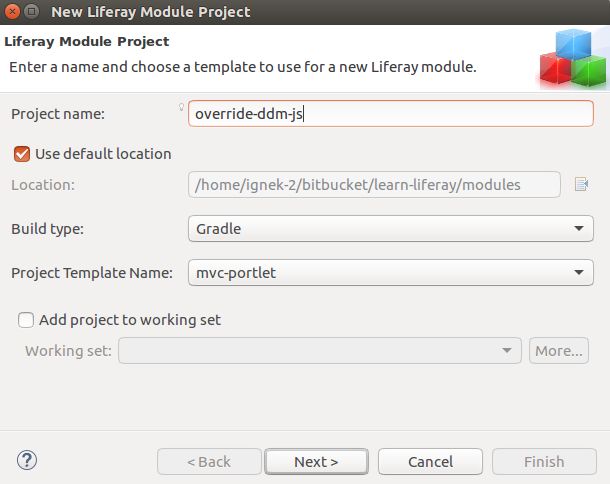
- Select other >> Liferay >> Liferay Module Project and click on “Next”
- Enter the project name (Ex. give project name “override-ddm-js” to override “dynamic-data-mapping-web.js” portal JavaScript file.)
- Select “Project Template Name” as “mvc-portlet” and click on “Next”
- Enter a Package name and click on “Finish”.
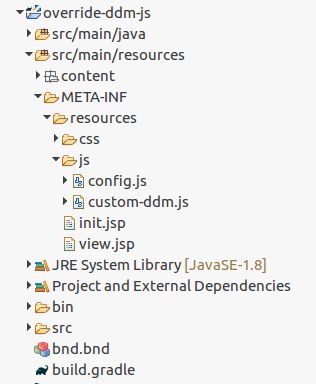
- Create a js folder in src/main/resources/META-INF/resources.
- Create your custom javascript file in the js folder. File structure of project will look like below : -
1Note :- please make sure, liferay default javascript file name and your javascript file name have different names.- Now add config.js file as below. Follow write your module’s configuration file for your requirement : -
1;(function() {
2var base = MODULE_PATH + '/js/';
3
4AUI().applyConfig(
5{
6groups: {
7OverrideDDMWeb: {
8base: base,
9combine: Liferay.AUI.getCombine(),
10filter: Liferay.AUI.getFilterConfig(),
11modules: {
12'liferay-portlet-dynamic-data-mapping-override': {   // Override module name
13path: 'custom-ddm.js',           //Override your custom javascript file name
14condition: {
15name: 'liferay-portlet-dynamic-data-mapping-override',
16trigger: 'liferay-portlet-dynamic-data-mapping',    // Give original module name
17when: 'instead'
18}
19},
20root: base
21}
22}
23}
24})();
25})
26- Now you need to update the module name in your custom javascript file as per your config.js file. ('liferay-portlet-dynamic-data-mapping-custom-fields-override' instead of liferay-portlet-dynamic-data-mapping-custom-fields) custom-ddm.js file : -
1AUI.add(
2	'liferay-portlet-dynamic-data-mapping-custom-fields-override',
3	function (A) {
4		...   // your logic
5})
6- Now you need to configure your module’s bnd.bnd file.
1Bundle-Name: override-ddm-js
2Bundle-SymbolicName: ….
3Bundle-Version: ….
4Export-Package: ….
5
6Liferay-JS-Config: /META-INF/resources/js/config.js
7Web-ContextPath: /override-ddm-js
8- Now, deploy the module.
1Note:- If javascript changes are not getting reflected, please follow the below steps:-- Give a different group name for every module in config.js file.
- Clear browser’s cache.
- Login into the liferay portal and clear cache. Goto Control Panel → configuration → server administration and then click on execute button for below actions.
- Clear the direct servlet cache.


