Liferay
Utilizing the no-code concept for Liferay website branding

Bhavin Panchani•Apr 19, 2024
Introduction:
Creating a theme sometimes becomes time-consuming and challenging to provide a consistent look and feel across all the pages of a Liferay portal. What if we make a website look cool without using our own created Liferay theme but using Liferay’s by default classic theme?
Let’s dive into Liferay’s out-of-the-box functionality and discover new ways to elevate the aesthetics of our portal. By thinking outside the box, we can create a unique and captivating user experience that breaks free from the traditional approach of making a Liferay theme.
Prerequisites:
- Liferay 7.4
Steps to be taken to create a website:
Here are the steps to create a website without using a Liferay theme:
- Create a CSS file in any code editor, such as Visual Studio Code.
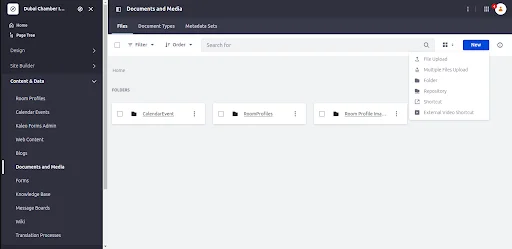
- Upload your CSS file in Document and Media by selecting “File Upload.”
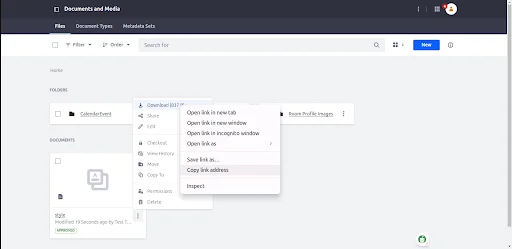
- Copy the link address of your CSS file.
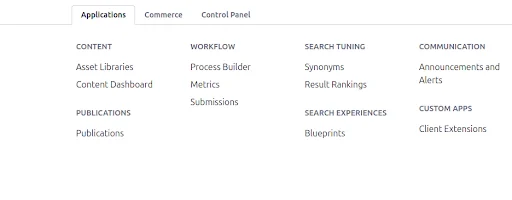
- Go to Client Extensions from Applications.
- Add your CSS file by selecting “Add CSS.”

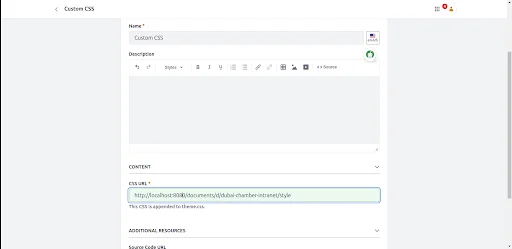
- Give a name and paste the copied link address in the CSS URL in a way that the below image shows, and publish it.
- Go to Pages from the site builder and click the setting icon.
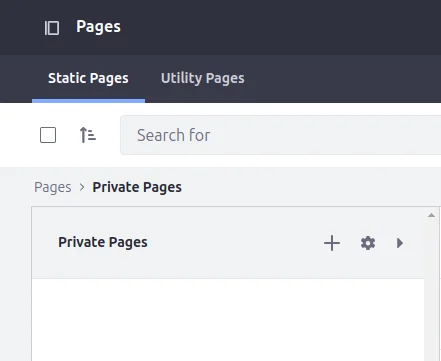
- Add CSS client extensions and save them.
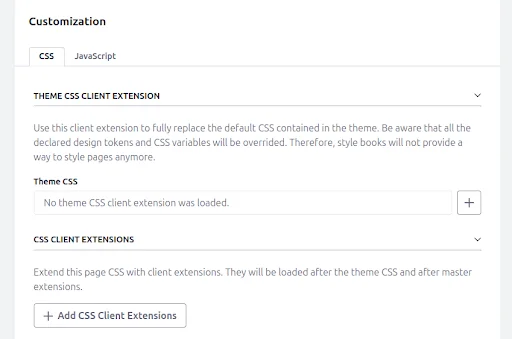
- Select the file that you want to upload to the website.

- Now whatever CSS code you wrote on that file will be loaded on the Liferay page.


