Real Time Speech-to-Text Integration in React Using Web Speech API

Introduction
We mostly use a keyboard when working with web applications. But sometimes typing takes time. If you fill a form, search for something, write notes, or do other thing at the same time, speaking can be much more easy.
Because of this, many websites and apps put voice to text now. It help users finish things more fast and also make the app easy to use for everyone.
Lots of people think putting voice typing in a React app is very hard. They think you must pay money, make a backend, or do too much setup. But this is not always true.
Modern browsers already have the Web Speech API inside them. It can change your voice into text right inside the browser. In this blog, we will see how this Web Speech API work, why it is good, and how you can add voice to text to your React app step by step.
The Challenge of Traditional Text Input
Typing is something we all do while using a web app. It works fine most of the time. But when the text is long, it can feel slow.
Take a support form as an example. A user has to explain the whole problem. Doing that on a mobile phone is not fun. The same thing happens in office apps. People keep typing customer details, notes, or other information every day. It takes time, and sometimes they just don't feel like typing everything.
In these situations, speaking is a better way. Most people can say a sentence much more fast than they can type it.
Still, many developers do not put this feature because they think they must pay for API, use servers, or do a very hard setup. Before, that was true sometimes, but not always.
Today, browsers already have the Web Speech API inside them. So adding voice to text is much more easy than many people think.
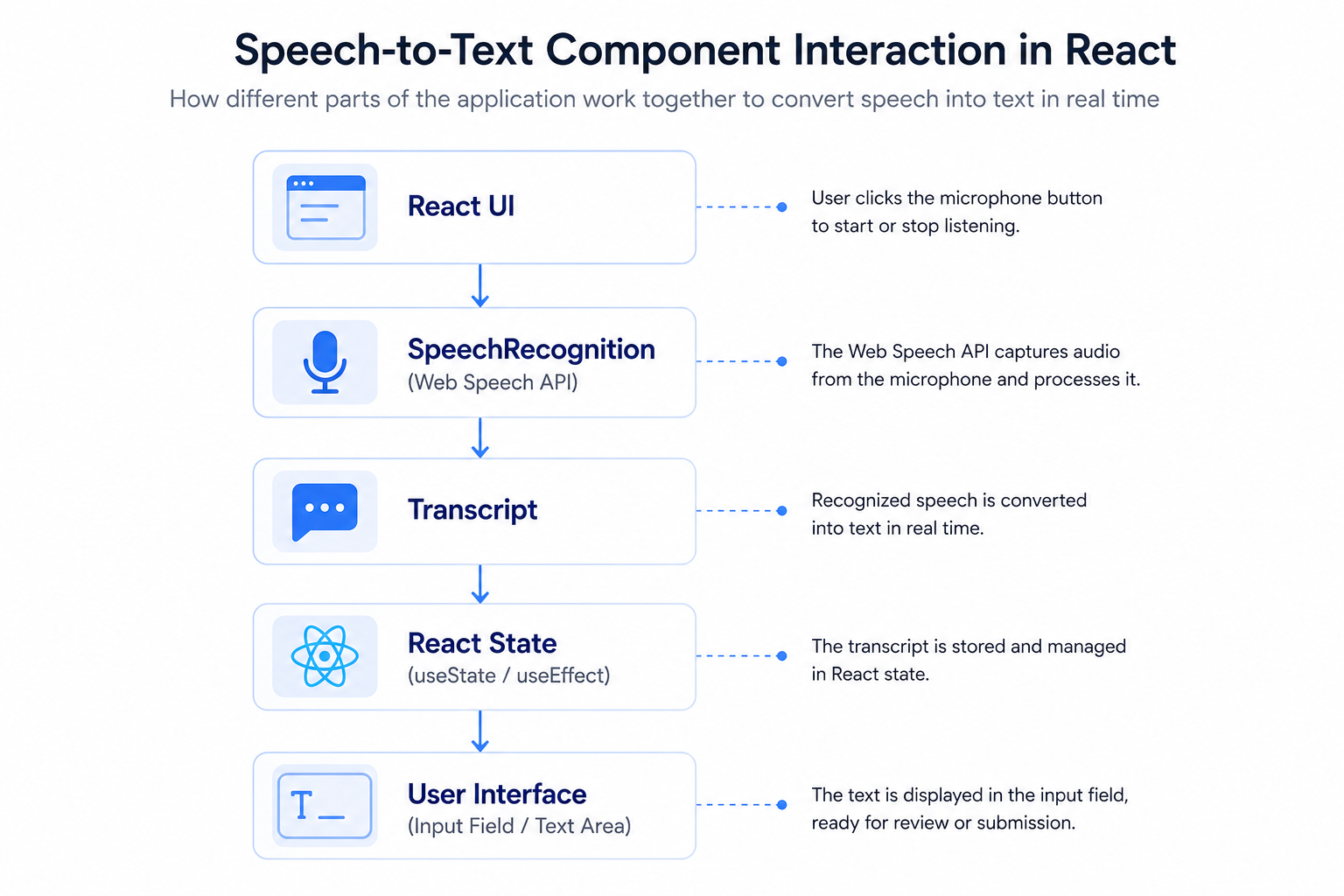
A Speech-to-Text Perspective
Speech-to-text simply means converting voice into text. When a user speaks, the browser listens through the microphone and keeps adding the recognized words to the screen.
React do not do the voice listening itself. That part is handled by the browser with the Web Speech API. React only get the text and change the screen. The same text can show in a search box, form place, or any other typing box.
Because the browser already give you this voice listening, you do not need much setup. Just a few event handlers and some state updates is enough to make the feature work.
Approaches to Speech-to-Text Integration
There isn't just one way to add speech-to-text in a React application. The right choice depends on what the application needs.
1. Using the Web Speech API
The easiest option is the Web Speech API. It is available in most modern browsers and can convert spoken words into text. The browser handles the microphone and speech recognition, while React only needs to display the text.
This works well for small to medium applications like forms, search boxes, dashboards, or internal tools where a simple speech-to-text feature is enough.
Pros
- Easy to set up
- No backend required
- Quick to build
- Good for live voice input
Things to know
- Browser support is not the same everywhere.
- Results can be different across browsers.
- Some browsers need an internet connection for speech recognition.
2. Using a React library
Another option is to use a React library built on top of the Web Speech API. These libraries handle things like microphone control, browser checks, and speech events. This keeps the React code a little cleaner.
This option is useful when faster development is more important than writing everything from scratch.
Pros
- Less code to write
- Easier to manage in React
- Faster to get started
Things to know
- These libraries still depend on the browser's speech recognition.
- Adding another package also means another dependency to maintain.
3. Using a cloud service
Some applications need better accuracy or extra features. In that case, cloud speech services are a better fit. They usually support more languages and offer features like custom words, speaker detection, and better transcription quality.
This approach is common in large business applications where speech recognition is an important part of the product.
Pros
- Better accuracy
- More language support
- Extra speech features
- Handles large-scale applications well
Things to know
- More setup is required.
- Backend integration is usually needed.
- Most services charge based on usage.
Why Choose the Web Speech API?
For most React applications, the Web Speech API is a good choice. It is simple to use and already available in modern browsers. In many cases, it is enough to add basic speech-to-text without spending extra time on a complex setup.
Some reasons why many developers choose it are:
- Converts speech into text in real time.
- Doesn't need much code.
- No separate backend for speech recognition.
- Makes the application easier to use.
- Works well on both desktop and mobile browsers.
- Can be added to existing React components without many changes.
If an application only needs basic speech-to-text, the Web Speech API is usually enough. It gets the job done without adding extra services or making the project more complicated.
Common Use Cases
Where speech-to-text can be useful
Speech-to-text is useful in many types of web applications. Some common examples are:
- Search bars
- Support forms
- Feedback forms
- CRM applications
- Healthcare systems
- Meeting notes
- Internal office tools
- Chat applications
- Accessibility features
More applications are adding voice input because it helps users complete tasks faster and with less typing.
Things to keep in mind
Before adding speech-to-text, there are a few things worth checking.
- Make sure the browser supports the Web Speech API.
- Show when the microphone is listening.
- Ask for microphone permission in a clear way.
- Give users a way to stop and start listening again.
- Let users edit the text after it is generated.
- Show a message if speech recognition is not supported.
These small things make the feature easier to use and help avoid confusion.
Conclusion
Voice to text is very normal in many website now. It save time, make you type less, and it make apps very easy for people to use.
For React app, the Web Speech API is most easy way to put this feature. Because the browser do all the listening, you only need write very little React code. You can put it in forms, search box, chat screen, and other typing place without make big change to your app.
If you only need simple voice to text, this Web Speech API is very good place to start. It is simple, cost no money, and work very good for many project.


