React design patterns: writing clean and maintainable code

Introduction:
React provides developers with many options to create application designs through its versatile nature. The many ways React facilitates development are beneficial, but cause codebases to become complicated for scaling and testing, and maintenance. The introduction of design patterns generates a solution to these challenges.
This blog examines critical React design patterns which developers should use to develop clean, sustainable and expansible codebases. These practices will enable solo coders and teamwork to develop robust professional React applications.
Prerequisites:
- Node.js and npm
- React
- Typescript
- React Hooks and Custom Hooks
- Higher Order Functions
Why Use React Design Patterns?
Developer solutions to recurrent software development difficulties appear as reusable abstract patterns. In the case of React.
- These coding practices enhance readability in addition to enabling smooth teamwork between different development teams.
- Uniform structures will support bug reduction.
- Elements of the system should have the capacity for reuse and extensive testing.
- The design pattern standardizes code structure to enhance the process of refactoring and new developer onboarding.
Presentational and Container Components Pattern:
The software principle of separation of concerns achieves excellent implementation support in React through its introduction of Presentational and Container components.
- UX elements receive attention through presentational components that define visual aspects (UI).
- Such components concentrate on system operation and handling of logical and data elements.
Presentational Component(UI) :
1// PresentationalComponent.tsx
2
3type UserCardProps = {
4  name: string;
5  email: string;
6};
7
8const UserCard: React.FC<UserCardProps> = ({ name, email }) => (
9  <div className="card">
10    <h3>{name}</h3>
11    <p>{email}</p>
12  </div>
13);
14
15export default UserCard;
Container Component(Logic) :
1// ContainerComponent.tsx
2import UserCard from '../components/UserCard';
3import { useEffect, useState } from 'react';
4
5type User = {
6  name: string;
7  email: string;
8};
9
10const UserCardContainer = () => {
11  const [user, setUser] = useState<User | null>(null);
12
13  useEffect(() => {
14    fetch('/api/user')
15      .then((res) => res.json())
16      .then(setUser);
17  }, []);
18
19  return user ? <UserCard name={user.name} email={user.email} /> : <p>Loading...</p>;
20};
21
22export default UserCardContainer;
Higher-Order Components:
An HOC functions through a process where it accepts a component to produce another component that inherits additional functionality.
- The behavior addition process does not impact the wrapped component.
- The framework provides context-based injection for adding props which include authorization and theme features.
- The implementation of permission wrappers and analytics hooks as well as other related functionality.
1// hoc/withAdminGuard.tsx
2
3import React from 'react';
4type WithAdminProps = {
5  isAdmin: boolean;
6};
7export function withAdminGuard<P extends object>(
8  WrappedComponent: React.ComponentType<P>
9) {
10  return ({ isAdmin, ...props }: WithAdminProps & P) => {
11    if (!isAdmin) return <p>Access denied</p>;
12    return <WrappedComponent {...(props as P)} />;
13  };
14}
Usage:
1//components/Dashboard.tsx
2
3const Dashboard = () => <h1>Admin Dashboard</h1>;
4
5export default withAdminGuard(Dashboard);
Custom Hooks:
Hooks represent the main benefit of modern React applications. Rephrase the complex effects and state management logic from components by moving them into customizable hooks known as custom hooks.
- All custom hooks begin with use (such as useAuth and useFetch, and useFormState).
- When using Hooks in your applications, always maintain their purity while allowing defined side effects to occur when necessary.
- Documentation of future input and output will enhance the developer experience.
- Custom hooks establish themselves as the main approach for creating reusable logic components.
1// hooks/useWindowSize.ts
2import { useEffect, useState } from 'react';
3
4type WindowSize = {
5  width: number;
6  height: number;
7};
8
9export const useWindowSize = (): WindowSize => {
10  const [size, setSize] = useState<WindowSize>({
11    width: window.innerWidth,
12    height: window.innerHeight,
13  });
14
15  useEffect(() => {
16    const handleResize = () =>
17      setSize({ width: window.innerWidth, height: window.innerHeight });
18    window.addEventListener('resize', handleResize);
19    return () => window.removeEventListener('resize', handleResize);
20  }, []);
21
22  return size;
23};
Compound Components:
Compound components built with React Context represent an elegant solution to share internal state between related components that avoid the need for drilling props.
1// components/Tabs.tsx
2import React, { createContext, useContext, useState } from 'react';
3
4type TabsContextType = {
5  activeIndex: number;
6  setActiveIndex: (index: number) => void;
7};
8
9const TabsContext = createContext<TabsContextType | undefined>(undefined);
10
11export const Tabs = ({ children }: { children: React.ReactNode }) => {
12  const [activeIndex, setActiveIndex] = useState(0);
13  return (
14    <TabsContext.Provider value={{ activeIndex, setActiveIndex }}>
15      <div className="tabs">{children}</div>
16    </TabsContext.Provider>
17  );
18};
19
20export const TabList = ({ children }: { children: React.ReactNode }) => (
21  <div className="tab-list">{children}</div>
22);
23export const Tab = ({ index, children }: { index: number; children: React.ReactNode }) => {
24  const context = useContext(TabsContext);
25  if (!context) throw new Error('Tab must be used within Tabs');
26
27  const isActive = context.activeIndex === index;
28  return (
29    <button onClick={() => context.setActiveIndex(index)} className={isActive ? 'active' : ''}>
30      {children}
31    </button>
32  );
33};
34
35export const TabPanel = ({ index, children }: { index: number; children: React.ReactNode }) => {
36  const context = useContext(TabsContext);
37  if (!context || context.activeIndex !== index) return null;
38  return <div className="tab-panel">{children}</div>;
39};
Render Props:
A single prop object allows us to replace multiple individual parameter passes by combining related values.
Using props as an object simplifies code structure and improves maintainability because it allows transmission of various connected values to a component.
1// components/MouseTracker.tsx
2import { useState } from 'react';
3
4type MouseProps = {
5  render: (x: number, y: number) => React.ReactNode;
6};
7
8export const MouseTracker: React.FC<MouseProps> = ({ render }) => {
9  const [coords, setCoords] = useState({ x: 0, y: 0 });
10
11  return (
12    <div
13      style={{ height: '100px', border: '1px solid black' }}
14      onMouseMove={(e) => setCoords({ x: e.clientX, y: e.clientY })}
15    >
16      {render(coords.x, coords.y)}
17    </div>
18  );
19};
Usage
1<MouseTracker render={(x, y) => <p>Mouse at ({x}, {y})</p>} />Controlled Component:
Functional forms require slight attention during their implementation. The value within the controlled input exists in the React state directly.
Uncontrolled components maintain their state inside the DOM while exposing this state through ref.
Controlled represents data that is more predictable and simpler to debug. The performance advantages favor uncontrolled elements when dealing with big forms and external integration points.
The most effective method involves controlled input for user-generated data alongside uncontrolled input for imported and read-only data.
1// components/ControlledInput.tsx
2import { useState } from 'react';
3
4const ControlledInput = () => {
5  const [value, setValue] = useState('');
6
7  return (
8    <input
9      value={value}
10      onChange={(e) => setValue(e.target.value)}
11      placeholder="Type here..."
12    />
13  );
14};
Use TypeScript:
Through typed functionality, TypeScript enables JavaScript users can discover errors in advance while developing code that remains easy to understand. Defining component data requirements enables better reliability and simplified maintenance of your React application through TypeScript.
Frontend Setup in React:
We’ll write the code to get a better understanding of React code patterns:
Step-by-step Implementation
1. Create a React App:
Let’s create a React app using the following command:
1//Create a react app using the following command
2npx create-react-app react-code-pattern --template typescript
After the setup is complete, navigate to your project folder:
1// Navigate to the project folder
2cd react-code-pattern
3npm start
This will start the development server, and you will be able to visit the app at http://localhost:3000.
2. Project Structure:
Make sure your project has the following folder structure:
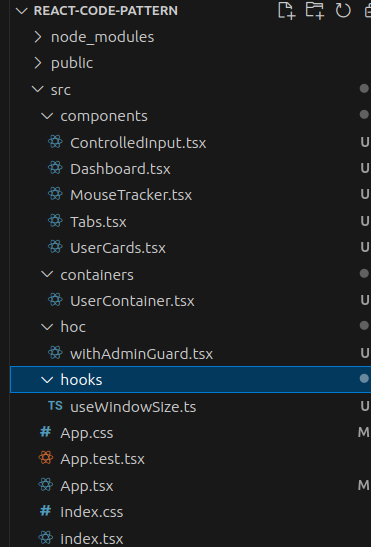
You can find the file codes in their respective section above.
Anti-Patterns to Avoid:
Our discussion of well-known patterns should include a mention of these problematic patterns.Props drilling too deep
- A requirement for maintaining clean React code involves achieving clear code alongside capabilities for future expansion.
- Overusing any in TypeScript
- Ignoring cleanup in useEffect
- State items that do not belong together should not be stored within a single useState hook call.
Conclusion:
A requirement for maintaining clean React code involves achieving clear code alongside capabilities for future expansion. Your code achieves lower maintenance costs with enhanced reliability due to the proper implementation of container components as well as custom hooks and compound components when using TypeScript. The adoption of proper techniques starts with small-scale testing to be used in future maintenance operations.


