Portlet Preferences in Liferay 7.2

Introduction
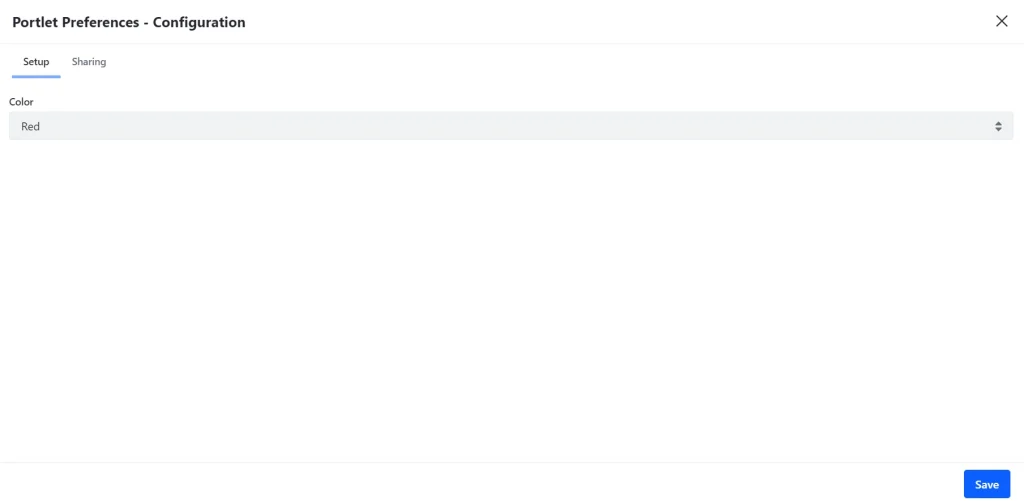
In order to have configurations at the portlet level in Liferay, we can implement portlet preference. In this example, we have implemented a color configuration for portlet in Liferay 7.2.
Prerequisites
- Java
- Liferay portal 7/7.x
Environment Requirement
- JDK
- Eclipse
- MySQL
1) Create a module project with below classes.
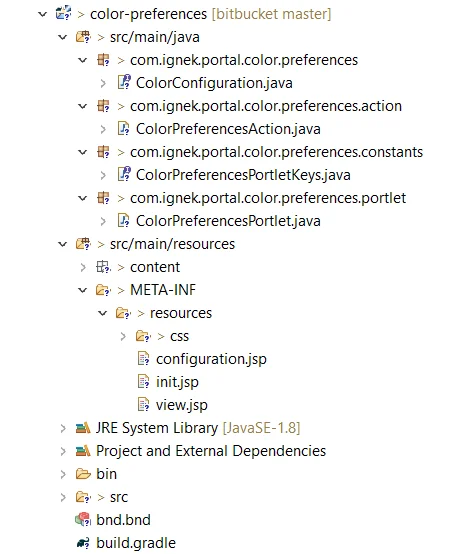
2) Create a Java interface.
1// ColorConfiguration.java
2@Meta.OCD(id = ColorPreferencePortletKeys.CONFIGURATION_ID)
3public interface ColorConfiguration {
4
5	@Meta.AD(deflt = "white",
6		name = "color",
7		optionLabels = { "%White", "%Red", "%Yellow" },
8		optionValues = { "white", "red", "yellow" },
9		required = false
10	)
11	public String color();
12}
Where,
@Meta.OCD is used to register this class as a configuration with a specific id. The ID must be the fully qualified configuration class name.
@Meta.AD specifies the default value of a configuration field as well as whether it’s required or not. Note that if you set a field as required and don’t specify a default value, the system administrator must specify a value in order for your application to work properly. Use the deflt property to specify a default value.
This portlet requires the following dependencies.
1// Dependencies
2compileOnly group: “biz.aQute.bnd”, name: “biz.aQute.bndlib”,version: “3.1.0”
3
4compileOnly’com.liferay:com.liferay.portal.configuration.metatype.api’
3) Create an action class.
Configuration action class is required to access portlet preferences. This class must extend the DefaultConfigurationAction class. It is responsible for storing portlet configurations.
1// ColorPreferencesAction.java
2package com.ignek.portal.color.preferences.action;
3
4
5@Component(
6	configurationPid = ColorPreferencePortletKeys.CONFIGURATION_ID,
7	configurationPolicy = ConfigurationPolicy.OPTIONAL,
8	immediate = true,
9	property = "javax.portlet.name=" + ColorPreferencePortletKeys.PORTLET_ID,
10	service = ConfigurationAction.class
11)
12
13public class ColorPreferencesAction extends DefaultConfigurationAction {
14
15	private volatile ColorConfiguration colorConfiguration;
16
17	@Override
18	public void processAction(PortletConfig portletConfig, ActionRequest actionRequest, ActionResponse actionResponse)
19			throws Exception {
20		String color = ParamUtil.getString(actionRequest, "color");
21		setPreference(actionRequest, "color", color);
22
23		super.processAction(portletConfig, actionRequest, actionResponse);
24	}
25
26	@Activate
27	@Modified
28	protected void activate(Map<Object, Object> properties) {
29		colorConfiguration = Configurable.createConfigurable(ColorConfiguration.class, properties);
30	}
31
32}
4) Implement your portlet class.
1// ColorPreferencesPortlet.java
2package com.ignek.portal.color.configuration.portlet
3
4@Component(
5          …
6)
7public class ColorPreferencesPortlet extends MVCPortlet {
8
9	private volatile ColorConfiguration colorConfiguration;
10
11	@Override
12	public void render(RenderRequest renderRequest, RenderResponse renderResponse)
13			throws IOException, PortletException {
14		renderRequest.setAttribute(ColorConfiguration.class.getName(), colorConfiguration);
15
16		super.render(renderRequest, renderResponse);
17	}
18
19	@Activate
20	@Modified
21	protected void activate(Map<String, Object> properties) {
22		colorConfiguration = ConfigurableUtil.createConfigurable(ColorConfiguration.class, properties);
23	}
24}
5) Now Implement your init.jsp.
1// init.jsp
2<%@page import="com.ignek.portal.config.ColorConfiguration"%>
3<%@ page import="com.liferay.portal.kernel.util.GetterUtil" %>
4<%@page import="com.liferay.portal.kernel.util.Validator"%>
5<%@page import="com.liferay.portal.kernel.util.StringPool"%>
6<%@ taglib uri="http://java.sun.com/jsp/jstl/core" prefix="c" %>
7<%@ taglib uri="http://java.sun.com/portlet" prefix="portlet" %>
8<%@ taglib uri="http://liferay.com/tld/aui" prefix="aui" %>
9<%@taglib uri="http://liferay.com/tld/portlet" prefix="liferay-portlet" %>
10<%@taglib uri="http://liferay.com/tld/theme" prefix="liferay-theme" %>
11<%@taglib uri="http://liferay.com/tld/ui" prefix="liferay-ui" %>
12
13<liferay-theme:defineObjects />
14<portlet:defineObjects />
15
16<%
17	ColorConfiguration colorConfiguration = (ColorConfiguration) renderRequest
18			.getAttribute(ColorConfiguration.class.getName());
19
20	String color = StringPool.BLANK;
21
22	if (Validator.isNotNull(colorConfiguration)) {
23		color = portletPreferences.getValue("color", colorConfiguration.color());
24	}
25%>
6) Create configuration.jsp.
Add all configurations’s input fields in this JSP file.
1// configuration.jsp
2<%@ include file="/init.jsp" %>
3
4<liferay-portlet:actionURL portletConfiguration="<%=true%>" var="configurationActionURL" />
5<liferay-portlet:renderURL portletConfiguration="<%=true%>" var="configurationRenderURL" />
6
7<aui:form action="<%=configurationActionURL%>" method="post" name="fm">
8	<aui:input name="<%=Constants.CMD%>" type="hidden" value="<%=Constants.UPDATE%>" />
9	<aui:input name="redirect" type="hidden" value="<%=configurationRenderURL%>" />
10
11	<aui:fieldset>
12		<aui:select label="Color" name="color" value="<%=color%>">
13			<aui:option value="white">White</aui:option>
14			<aui:option value="red">Red</aui:option>
15			<aui:option value="yellow">Yellow</aui:option>
16		</aui:select>
17	</aui:fieldset>
18
19	<aui:button-row>
20		<aui:button type="submit"></aui:button>
21	</aui:button-row>
22</aui:form>
7) Add the below code in your view.jsp.
1// view.jsp
2<%@ include file="/init.jsp"%>
3
4<p>
5	Favorite color: <span style="color: <%=color%>;"><%=color%></span>
6</p>- Now, deploy this module.
- Add your portlet to a Liferay page.
- Click on the ellipsis icon and select the option Configuration.
- Change the configuration and save it.
Output: