React Insights : Choosing Between useLayoutEffect and useEffect

Introduction:
You can use useEffect and useLayoutEffect, two hooks of React, to manage a side effect in your React components. As your React applications are created, knowing when to use useEffect or useLayoutEffect could impact your application's performance and experiences. Both hooks serve for side effects management over functional components, but they act differently on rendering. Hence let's get into some detail about them, their differences, and some good examples of them.
Prerequisites:
- Node.js and npm
- React
- Typescript
- React Hooks
What is useEffect?
The useEffect is one of the most common hooks, which is used to define side effects inside a functional component. Side effects might be operations where data goes outside the component, like fetching, manipulating the DOM, or even using a container to bring some data. The useEffect will run after the render is committed to the screen.
The useEffect hook in React takes two parameters:
- Callback function: This function consists of the side-effect code you would like to execute.
- Optional dependency array: The callback function is executed when the values in this array change. Without the dependencies, the callback runs after absolute rendering.
By, therefore using dependencies, you can specify when to re-run the side effects for a performance optimization of the component.
When to use:
In most instances, useEffect should be your preferred hook for managing side effects. Here are some scenarios where useEffect is more appropriate:
- Data fetching: Calling API after the component is mounted.
- Adding event listeners: For events such as scroll or resize.
- Updating non-UI state: Updating states that don’t impact the immediate layout.
Syntax:
1useEffect(() => {
2  // Side effect function
3}, [dependencies]);
Here are some examples of how to use useEffect:
1. useEffect with an Empty Dependency Array: This runs only once when the component mounts, like componentDidMount.
1import React, { useEffect } from 'react';
2function UseEffectWithEmptyArray() {
3  useEffect(() => {
4    console.log('Component mounted!');
5  }, []); // Empty array ensures it only runs once
6  return <div>Check the console to see the mount message.</div>;
7}
8
2. useEffect with Specific Dependencies: This will run whenever the specified dependencies change.
1import React, { useState, useEffect } from 'react';
2function UseEffectWithDependencies() {
3  const [count, setCount] = useState(0);
4  useEffect(() => {
5    console.log(`Count changed: ${count}`);
6  }, [count]); // Runs only when `count` changes
7  return (
8    <div>
9      <p>Count: {count}</p>
10      <button onClick={() => setCount(count + 1)}>Increase Count</button>
11    </div>
12  );
13}
3. Cleaning up in useEffect: If the effect returns a cleanup function, it will run when the component unmounts or before the next impact runs.
1import React, { useState, useEffect } from 'react';
2
3function TimerComponent() {
4  const [seconds, setSeconds] = useState(0);
5  useEffect(() => {
6    const interval = setInterval(() => {
7      setSeconds((prevSeconds) => prevSeconds + 1);
8    }, 1000);
9    return () => {
10      clearInterval(interval); // Cleanup to avoid memory leaks
11    };
12  }, []); // Empty dependency array, runs only on mount and unmount
13  return <div>Timer: {seconds} seconds</div>;
14}
What is useLayoutEffect?
The usage of useLayoutEffect is more likely to be similar to that of useEffect; however, the former is executed synchronously after all mutations to the DOM have been completed but before the browser paints. This hook is very important when you need to measure or change the layout of the DOM synchronously since you need to ensure that it will most likely run before the user sees any visual changes.
The useLayoutEffect hook in React takes two arguments:
- Effect function: This function contains the effect code that you want to run after the DOM has been updated but before the browser has been painted.
- Optional dependency array: The effect function is only called when any of the values in this array change. In the absence of dependencies, the effect will run after every render.
This hook is similar to useEffect, but it fires synchronously after all DOM mutations. It is useful for effects that need to interact with the layout before the screen is updated.
When to use:
Use useLayoutEffect when you need to make changes that affect the layout or DOM measurements before the user sees them. Some common scenarios include::
- Measuring elements: Getting the dimensions of an element and setting the layout accordingly.
- Synchronous DOM manipulation: To make changes realize that they have to be made before they are brought to the attention of the user.
Syntax:
1useLayoutEffect(() => {
2// runs synchronously after commit
3return () => {
4// cleanup
5}}, [input])
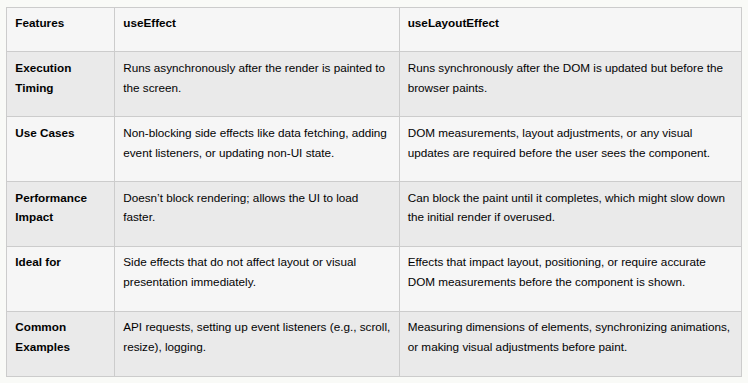
Comparison useEffect Vs useLayoutEffect:
Frontend Setup in React
We’ll write the code to get a better understanding of useEffect and useEffectLayou hooks.
Step-by-step Implementation
1. Create a React App
Let’s create a React app using the following command:
1//Create a react app using the following command
2
3npx create-react-app react-hooks-app --template typescript
After the setup is complete, navigate to your project folder:
1// Navigate to the project folder
2 cd react-hooks-app
3 npm start
This will launch the development server, and you’ll be able to view the app at http://localhost:3000.
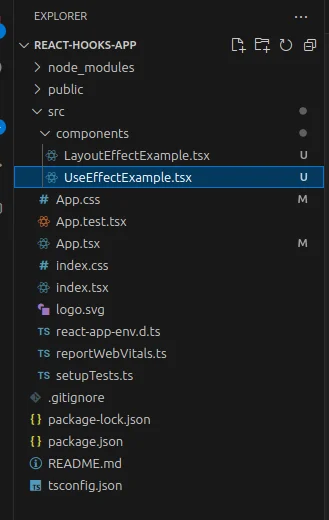
2. Project Structure:
Make sure your project has the following folder structure:
3. useEffect() Hooks Example:
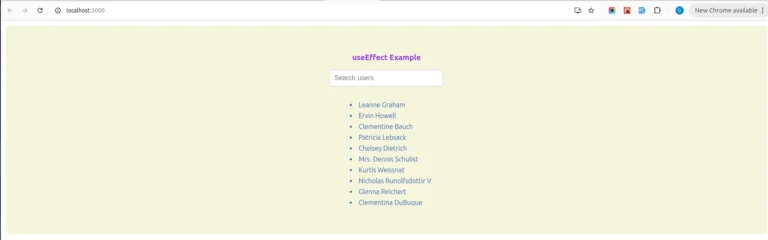
We're going to make a separate UseEffectExample component, which will be present in the components folder. The component will have a search bar that will be used to filter out users from the list based on searching.
In addition, we will use the useEffect hook to monitor any changes to the search string so that the list of filtered users can be updated accordingly. The above scenario tells how effective useEffect can be in facilitating the initial data fetching as well as live filtering while the user types.
1// UseEffectExample.tsx
2import React, { useState, useEffect } from 'react';
3
4interface User {
5  id: number;
6  name: string;
7}
8
9const UseEffectExample: React.FC = () => {
10  const [users, setUsers] = useState<User[]>([]);
11  const [filteredUsers, setFilteredUsers] = useState<User[]>([]);
12  const [searchQuery, setSearchQuery] = useState<string>('');
13
14  // Fetch users on component mount
15  useEffect(() => {
16    const fetchUsers = async () => {
17      const response = await fetch('https://jsonplaceholder.typicode.com/users');
18      const data: User[] = await response.json();
19      setUsers(data);
20      setFilteredUsers(data); // Initially show all users
21    };
22
23    fetchUsers();
24  }, []); // Empty dependency array to fetch data only on mount
25
26  // Update filteredUsers when searchQuery changes
27  useEffect(() => {
28    const filtered = users.filter(user =>
29      user.name.toLowerCase().includes(searchQuery.toLowerCase())
30    );
31    setFilteredUsers(filtered);
32  }, [searchQuery, users]); // Runs whenever searchQuery or users changes
33
34  return (
35    <div className='container'>
36      <h3>useEffect Example</h3>
37      <input
38        type="text"
39        placeholder="Search users"
40        value={searchQuery}
41        onChange={(e) => setSearchQuery(e.target.value)}
42      />
43      <ul>
44        {filteredUsers.map((user) => (
45          <li key={user.id} className='user-name'>{user.name}</li>
46        ))}
47      </ul>
48    </div>
49  );
50};
51
52export default UseEffectExample;
Here is a detailed explanation of the code:
- Fetching Data: While the component mounts, useEffect will fetch the users' list from an API and set it in state users.
- Filtering Users: Another useEffect will keep track of searchQuery and users. Every time the searchQuery changes, it will filter the users to allow only those whose names contain the search text.
- Updating the Filtered List: The filtered results go into filteredUsers, which will be used to render the component.
4. useLayoutEffect() Hooks Example:
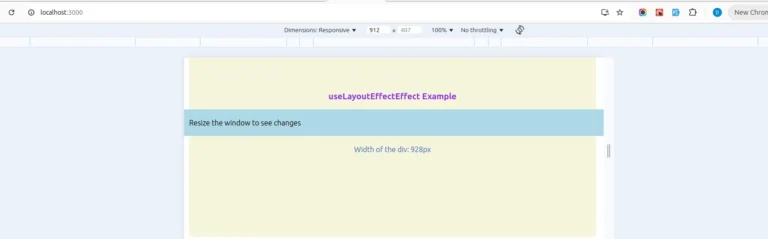
We’ll create a standalone LayoutEffectExample component within the components folder.
1// LayoutEffectExample.tsx
2import React, { useLayoutEffect, useRef, useState } from "react";
3
4const LayoutEffectExample: React.FC = () => {
5  const [width, setWidth] = useState<number>(0);
6  const divRef = useRef<HTMLDivElement>(null);
7
8  useLayoutEffect(() => {
9    // Ensure divRef is defined before accessing clientWidth
10    if (divRef.current) {
11      const handleResize = () => {
12        setWidth(divRef.current!.clientWidth);
13      };
14
15      // Set initial width
16      handleResize();
17
18      // Add resize listener
19      window.addEventListener("resize", handleResize);
20
21      // Cleanup event listener on unmount
22      return () => window.removeEventListener("resize", handleResize);
23    }
24  }, []); // Empty dependency array to run only on mount/unmount
25
26  return (
27    <div className="container">
28      <h3>useLayoutEffectEffect Example</h3>
29
30      <div
31        ref={divRef}
32        className="div-container"
33      >
34        Resize the window to see changes
35      </div>
36      <p className='width-text'>Width of the div: {width}px</p>
37    </div>
38  );
39};
40
41export default LayoutEffectExample;
Here is a detailed explanation of the code:
- Ref for the element: divRef is a reference to the <div> element.
- useLayoutEffect: Invoked post DOM update by the browser to provide us time to measure the element in question's width before proceeding with a repaint.
- Event Listener: The resize event will keep the width updated as long as the window is resized, and clean-up will remove the listener when the component unmounts.
5. Integrating the Components into the App:
Now we will import the UseEffectExample and LayoutEffectExample components into the main App.tsx file. This will create the UI renderer for that component.
1//App.tsx
2import React from "react";
3import "./App.css";
4import UseEffectExample from "./components/UseEffectExample";
5import LayoutEffectExample from "./components/LayoutEffectExample";
6
7function App() {
8  return (
9    <>
10      <LayoutEffectExample />
11      <UseEffectExample />
12    </>
13  );
14}
15export default App;
Output:
Conclusion:
Understanding when to use useEffect versus useLayoutEffect in React enhances performance and user experience. Use useEffect for non-blocking tasks like data fetching and event listeners, as it runs after rendering, ensuring faster load times. Use useLayoutEffect for layout-related tasks requiring synchronous execution after DOM updates but before painting, such as DOM measurements and layout adjustments.
Thoughtful use of these hooks improves performance, prevents layout shifts, and ensures a smoother user experience.


