CSS VS Theme CSS Client-Extension

Introduction
When developing in Liferay DXP or Liferay 7.4+, you’ll encounter various ways to customize the look and feel of your portal. Two common methods are through CSS Client Extensions and Theme CSS Client Extensions. They might seem similar—both deal with adding CSS to your Liferay site, but they serve different purposes and have distinct use cases. In this blog, we’ll understand the differences, benefits, and when to use both client extensions.
Prerequisites
- Liferay DXP
- Basic knowledge of Liferay
What is Client Extension?
A Client Extension in Liferay is a method for extending and customizing Liferay's functionality without directly modifying the core platform.
CSS Client Extension
- Purpose :
- To inject custom CSS into your Liferay site that applies globally or to specific parts of your portal.
- Key Features :
- Targets global styles.
- Can override portal or theme styles.
- Lightweight and easy to maintain.
- Does not require a full theme or war deployment.
- Use Case :
- You want to change the style of a few components (e.g., button colors, layout margins) across all pages without building a custom theme.
- You want to change the style of a few components (e.g., button colors, layout margins) across all pages without building a custom theme.
Steps To Create a CSS Client Extension :
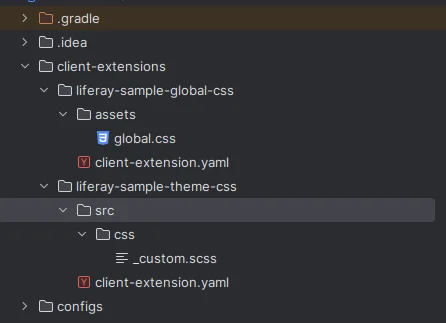
Step 1 : Create folder structure
Create a folder structure for the client extension. First, create a client-extension folder in your workspace. For that, you can refer to this image for the folder structure.
Step 2 : Add CSS and YAML file content
Add content into your client-extension.yaml file and global.css file.
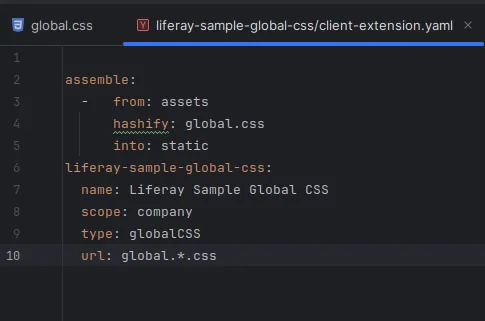
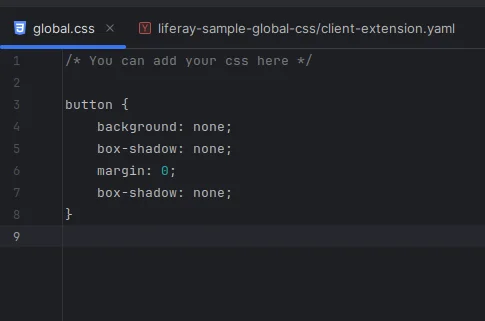
This CSS client extension will change the appearance of the button on the page where it is applied in the configuration.
For building and deploying the client extension, you can use these commands.
1./gradlew build -p client-extension/your_client-extension_name
2./gradlew deploy -p client-extension/your_client-extension_name
Theme CSS Client Extension :
- Purpose :
- Its main purpose is to modify or override the theme without creating a full theme.
- Key Features :
- Tied to a specific theme ID.
- Injected after the theme CSS, so it’s ideal for overrides.
- Useful for multi-site deployments using the same theme base with minor styling differences.
- Use Case :
- You have multiple sites using the same theme, but one site needs slightly different header styling or footer spacing.
Steps to create Theme CSS Client Extension:
Step 1: Create folder Structure :
For that, you refer to the above image.
Step 2: Add CSS and YAML file content :
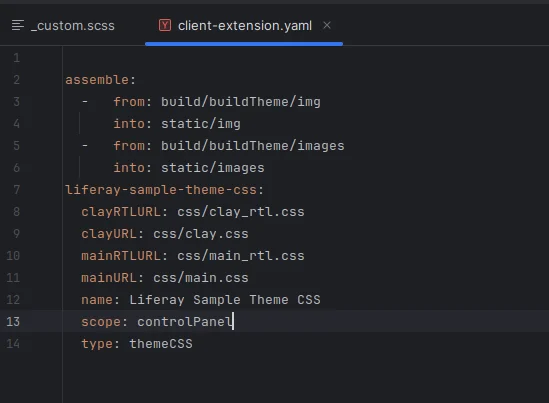
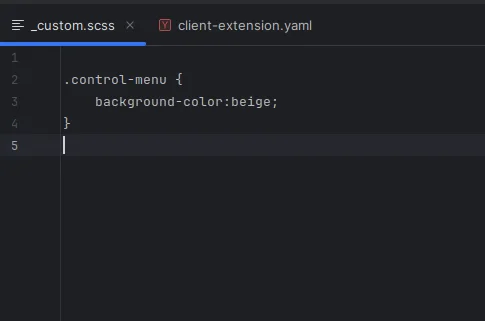
This will change the color of the control menu of Liferay.
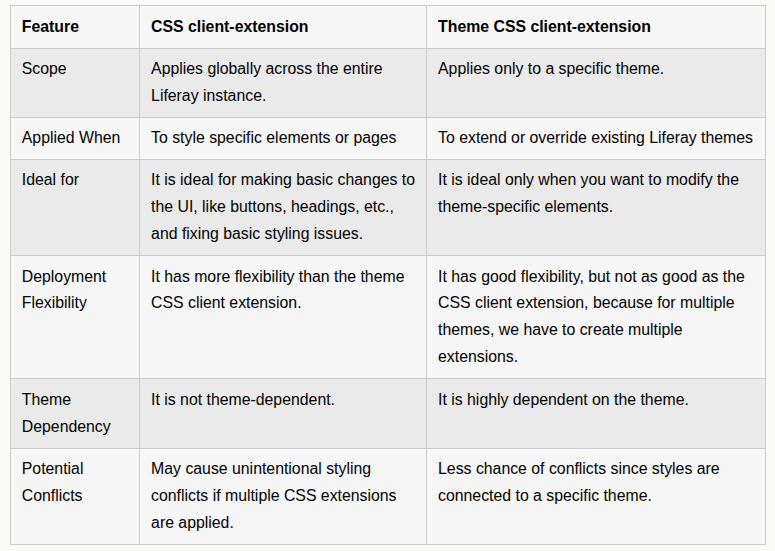
Key Differences :
Can We Use Both?
Yes, it’s common to combine both. Use the CSS Client extension for base styling that applies across all sites, and the Theme CSS Client extension for theme-specific overrides.
Conclusion
Understanding the difference between CSS and Theme CSS Client Extensions in Liferay helps you choose the right tool for your customization needs. For simple, global changes, CSS Client-Extension is your go-to. For theme-aware customization, Theme CSS Client-Extension gives you precision without the overhead of a full theme project. By leveraging Client Extensions properly, you keep your code modular, scalable, and easier to maintain—perfect for modern enterprise Liferay development.


