Spring Boot
GraphQL with Spring Boot

Vikkey Barapate•Aug 28, 2023
What is GraphQL?
- GraphQL stands for Graph Query Language. It is a language for querying the data as per user needs by using a single endpoint.
- It is an open-source query language that describes how a client should request information through an API by using a single endpoint.GraphQL is a syntax that can be used to ask for specific data as per client requirements and no need to give different APIs for each different data.
- It can be used with a custom query for API, and run the API in the form of the query language on the server side by using a type system that defines how you can define your data by query and run by using only one endpoint rather than the use of multiple APIs in REST.
- There are three major considerations while using GraphQL:
1// Write for what you want //
2{
3project (name: "GraphQL") {
4    tagline
5    }
6}1//Describe or define data //
2 type Project {
3 name: String
4 tagline: String
5 contributors: [User]
6}1// Get the required result //
2"project": {
3"tagline": "A query
4language for APIs"
5 }
6}How does GraphQL work?
- GraphQL provides a different set of types that query on that particular data by using schema and then, queries and mutations are come, and validated by using schema, and processed by using resolver.
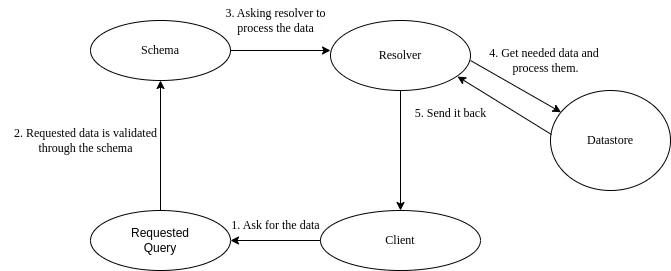
- Schema- Schema is how you will define your data or how you request your data and how the API will respond to that data. The schema is the concept of server and client.
- Resolver- Resolver is used for fetching the data, processing the data, then transferring the fetched data and processing the data by using GraphQL array. Resolver gives the result by using the callable function.
Why use GraphQL instead of REST?
- It gives us a single endpoint, we do not need to create the different APIs for the same data. GraphQL is strongly typed, you can also check or validate the GraphQL query before the execution.
- GraphQL helps to build powerful APIs and clients also know what they exactly want and what different types of operations they can perform.
Example-
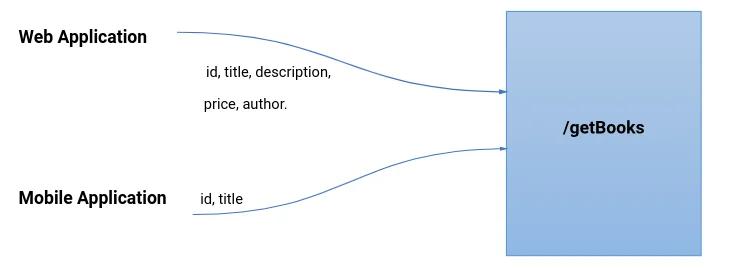
- Suppose, we have two applications one is Web Application and the second is Mobile Application, and /getBooks is an API for fetching the data.
- Web Application can send the request for getting the book details by using the field like id, title, description, price, and author, also Mobile application wants the same data but uses only two fields id and title only.
- But we made the normal APIs, so Mobile Application wants only two fields of id and title, but by using normal APIs Mobile Application gets all the data like id, title, description, price, and author when the Mobile application hits the same endpoint /getBooks.
- Even though we use different data we made the different REST APIs for Web Application and also for Mobile Application, so this is a very costly and inefficient way. This problem is solved by GraphQL. By using GraphQL the data is passed into the form of the query by using a single endpoint.
What is the difference between GraphQL and REST API?
- The difference between GraphQL and REST is how data will be sent by the client or in which manner they were sent. In the REST API, the client sends the HTTP request and gets the data as an HTTP response. Other than GraphQL, the client sends the request in the form of Queries.
Types of operations in GraphQL
- Two types of operations are performed in GraphQL:
- Queries
- Mutations
1. Queries: By using Queries we fetch or get the data.
- Queries are written like,
1type Query {
2    Greetings
3}- And how to run the Queries,
1// query with name myQuery
2query {
3   myQuery {
4    greetings
5    }
6}
2. Mutation: Mutations is use to modify server-side data. By using mutation, we insert, update or delete the data.
- Mutation writes like,
1type Mutation {
2    greetings
3}- And how to run the Mutation,
1// query with name myQuery
2mutation {
3    myQuery (fieldname: {
4        greetings
5    })
6}
Annotations in GraphQL with Springboot
- Annotations are used in GraphQL with Springboot:
- @SchemaMapping: The @SchemaMapping annotation is used with both Mutation, Query, and Subscription.
- @QueryMapping: @QueryMapping is used to get the data.
- @MutationMapping: @MutationMapping is used when modifying or creating the data.
- @Argument: Used to filter out the data, like example: id.
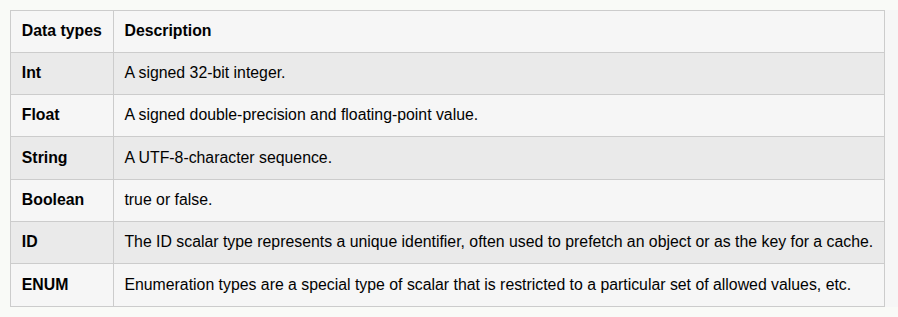
Inbuilt data types in GraphQL:
- GraphQL provides some inbuilt datatype:
Example of GraphQL with Spring Boot:
- Step 1: Create a Springboot project using spring initalizr.
- Step 2: Choose the Project field as Maven, Language as Java, and Springboot version give the name to the project.
- Add dependency of Spring Web, Spring for GraphQL, Spring Data JPA, and choose any database driver (e.g., MySQL Driver here).
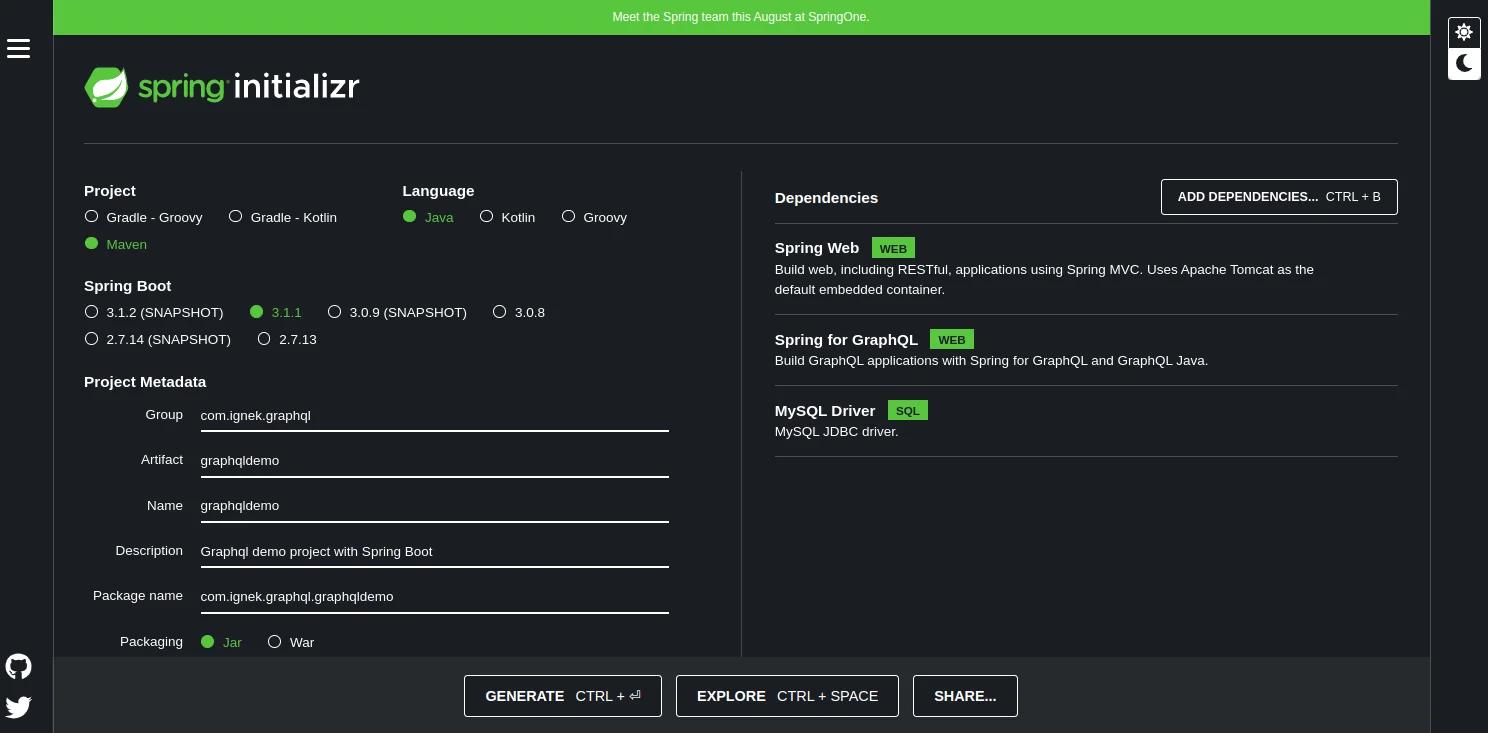
- Step 3: Extract the Springboot application and import the application into any IDE (e.g., Eclipse here) and open the pom.xml, and check whether the dependency is correctly added or not.
1// pom.xml //
2<?xml version="1.0" encoding="UTF-8"?>
3
4<project xmlns="http://maven.apache.org/POM/4.0.0" xmlns:xsi="http://www.w3.org/2001/XMLSchema-instance"
5	xsi:schemaLocation="http://maven.apache.org/POM/4.0.0 https://maven.apache.org/xsd/maven-4.0.0.xsd">
6
7	<modelVersion>4.0.0</modelVersion>
8
9	<parent>
10		<groupId>org.springframework.boot</groupId>
11		<artifactId>spring-boot-starter-parent</artifactId>
12		<version>3.1.1</version>
13		<relativePath/> <!-- lookup parent from repository -->
14	</parent>
15
16	<groupId>com.graphql</groupId>
17	<artifactId>graphqldemo</artifactId>
18	<version>0.0.1-SNAPSHOT</version>
19	<name>graphqldemo</name>
20	<description>Demo project for Spring Boot</description>
21
22	<properties>
23		<java.version>17</java.version>
24	</properties>
25
26	<dependencies>
27		<dependency>
28            <groupId>org.springframework.boot</groupId>
29            <artifactId>spring-boot-starter-data-jpa</artifactId>
30        </dependency>
31		<dependency>
32			<groupId>org.springframework.boot</groupId>
33			<artifactId>spring-boot-starter-graphql</artifactId>
34		</dependency>
35		<dependency>
36			<groupId>org.springframework.boot</groupId>
37			<artifactId>spring-boot-starter-web</artifactId>
38		</dependency>
39		<dependency>
40			<groupId>com.mysql</groupId>
41			<artifactId>mysql-connector-j</artifactId>
42			<scope>runtime</scope>
43		</dependency>
44		<dependency>
45			<groupId>org.projectlombok</groupId>
46			<artifactId>lombok</artifactId>
47			<optional>true</optional>
48		</dependency>
49		<dependency>
50			<groupId>org.springframework.boot</groupId>
51			<artifactId>spring-boot-starter-test</artifactId>
52			<scope>test</scope>
53		</dependency>
54		<dependency>
55			<groupId>org.springframework</groupId>
56			<artifactId>spring-webflux</artifactId>
57			<scope>test</scope>
58		</dependency>
59		<dependency>
60			<groupId>org.springframework.boot</groupId>
61			<artifactId>spring-boot-devtools</artifactId>
62			<scope>runtime</scope>
63			<optional>true</optional>
64		</dependency>
65		<dependency>
66		    <groupId>org.hibernate</groupId>
67		    <artifactId>hibernate-core</artifactId>
68		    <version>6.2.4.Final</version>
69		    <type>pom</type>
70    	 </dependency>
71		 <dependency>
72			 <groupId>com.fasterxml.jackson.core</groupId>
73			  <artifactId>jackson-databind</artifactId>
74		 </dependency>
75	     <dependency>
76			<groupId>org.springframework.graphql</groupId>
77			<artifactId>spring-graphql-test</artifactId>
78			<scope>test</scope>
79		 </dependency>
80	</dependencies>
81
82	<build>
83		<plugins>
84			<plugin>
85				<groupId>org.springframework.boot</groupId>
86				<artifactId>spring-boot-maven-plugin</artifactId>
87				<configuration>
88					<excludes>
89						<exclude>
90							<groupId>org.projectlombok</groupId>
91							<artifactId>lombok</artifactId>
92						</exclude>
93					</excludes>
94				</configuration>
95			</plugin>
96		</plugins>
97	</build>
98
99</project>- Step 4: Open the application.properties file. Configure the port for API and MySQL database.
1// application.properties //
2server.port=8009
3spring.jpa.hibernate.ddl-auto=update
4spring.datasource.url=jdbc:mysql://${MYSQL_HOST:localhost}:3306/Graphql_db
5spring.datasource.username=root
6spring.datasource.password=root
7spring.datasource.driver-class-name=com.mysql.cj.jdbc.Driver
8spring.jpa.show-sql=true
9spring.jpa.properties.hibernate.globally_quoted_identifiers=true- Step 5: Create the package in src/main/java directory, and create the model class(here, Book.java).
1// Book.java //
2package com.graphql.graphqldemo.model;
3
4import jakarta.persistence.Entity;
5import jakarta.persistence.GeneratedValue;
6import jakarta.persistence.GenerationType;
7import jakarta.persistence.Id;
8import jakarta.persistence.Table;
9
10@Entity
11@Table(name = "book_details")
12public class Book {
13	@Id
14	@GeneratedValue(strategy = GenerationType.AUTO)
15	private int id;
16	private String title;
17	private String desc;
18	private String author;
19	private double price;
20	private int pages;
21
22	public Book() {
23		super();
24		// TODO Auto-generated constructor stub
25	}
26	public Book(int id, String title, String desc, String author, double price, int pages) {
27		super();
28		this.id = id;
29		this.title = title;
30		this.desc = desc;
31		this.author = author;
32		this.price = price;
33		this.pages = pages;
34	}
35	public int getId() {
36		return id;
37	}
38	public void setId(int id) {
39		this.id = id;
40	}
41	public String getTitle() {
42		return title;
43	}
44	public void setTitle(String title) {
45		this.title = title;
46	}
47	public String getDesc() {
48		return desc;
49	}
50	public void setDesc(String desc) {
51		this.desc = desc;
52	}
53	public String getAuthor() {
54		return author;
55	}
56	public void setAuthor(String author) {
57		this.author = author;
58	}
59	public double getPrice() {
60		return price;
61	}
62	public void setPrice(double price) {
63		this.price = price;
64	}
65	public int getPages() {
66		return pages;
67	}
68	public void setPages(int pages) {
69		this.pages = pages;
70	}
71	@Override
72	public String toString() {
73		return "Book [id=" + id + ", title=" + title + ", desc=" + desc + ", author=" + author + ", price=" + price
74				+ ", pages=" + pages + "]";
75	}
76}- Step 6: Create another package and create the Repo class (here, BookRespository.java).
1// BookRespository.java //
2package com.graphql.graphqldemo.repository;
3
4import org.springframework.data.jpa.repository.JpaRepository;
5import com.graphql.graphqldemo.model.Book;
6
7public interface BookRepository extends JpaRepository<Book, Integer>{
8
9}- Step 7: Create another package and create a Service class (here, BookServices.java).
- We are injecting BookRepository dependency on this service.
1// BookServices.java //
2package com.graphql.graphqldemo.services;
3
4import java.util.ArrayList;
5import java.util.List;
6import org.springframework.beans.factory.annotation.Autowired;
7import org.springframework.stereotype.Service;
8import com.graphql.graphqldemo.model.Book;
9import com.graphql.graphqldemo.repository.BookRepository;
10
11@Service
12public class BookServices {
13
14	@Autowired
15	BookRepository bookRepository;
16	//Adding Book
17	public Book addBook(Book book) {
18	    bookRepository.save(book);
19	    return book;
20	}
21	//GetAll Customers
22	public List getBooks(){
23		List book = new ArrayList<>();
24		bookRepository.findAll().forEach(books -> book.add(books));
25		return book;
26	}
27	//Get Customer findById
28	public Book getBookById(int id) {
29		return bookRepository.findById(id).get();
30	}
31}- Step 8: Create another package and create the Controller class (here, BookController.java).
- Instead of @GetMapping in REST, in GraphQL we are using @QueryMapping to get or fetch the data.
- Instead of @PostMapping in REST, in GraphQL we are using the @MutationMapping to add or create the data..
1// BookController.java //
2package com.graphql.graphqldemo.controller;
3
4import java.util.List;
5import org.springframework.beans.factory.annotation.Autowired;
6import org.springframework.graphql.data.method.annotation.Argument;
7import org.springframework.graphql.data.method.annotation.MutationMapping;
8import org.springframework.graphql.data.method.annotation.QueryMapping;
9import org.springframework.stereotype.Controller;
10import org.springframework.web.bind.annotation.GetMapping;
11import org.springframework.web.bind.annotation.PathVariable;
12import org.springframework.web.bind.annotation.PostMapping;
13import org.springframework.web.bind.annotation.RequestBody;
14import org.springframework.web.bind.annotation.RequestMapping;
15import org.springframework.web.bind.annotation.RestController;
16import com.graphql.graphqldemo.model.Book;
17import com.graphql.graphqldemo.services.BookServices;
18import lombok.Getter;
19import lombok.Setter;
20
21@Controller
22//@RestController
23//@RequestMapping("/books")
24public class BookController {
25	@Autowired
26	BookServices bookServices;
27//	@PostMapping("/addBook")
28	@MutationMapping("createBook")
29	public Book addBook(@Argument BookInput book) {
30		Book b = new Book();
31		b.setTitle(book.getTitle());
32		b.setDesc(book.getDesc());
33		b.setAuthor(book.getAuthor());
34		b.setPrice(book.getPrice());
35		b.setPages(book.getPages());
36		return this.bookServices.addBook(b);
37	}
38//	@GetMapping("/getBooks")
39	@QueryMapping("allBooks")
40	public List getBooks(){
41		return bookServices.getBooks();
42	}
43//	@GetMapping("/getBook/{id}")
44	@QueryMapping("getBook")
45	public Book getBookById(@Argument int id){
46		return bookServices.getBookById(id);
47	}
48}
49class BookInput{
50	private String title;
51	private String desc;
52	private String author;
53	private double price;
54	private int pages;
55	public BookInput() {
56		super();
57		// TODO Auto-generated constructor stub
58	}
59	public BookInput(String title, String desc, String author, double price, int pages) {
60		super();
61		this.title = title;
62		this.desc = desc;
63		this.author = author;
64		this.price = price;
65		this.pages = pages;
66	}
67	public String getTitle() {
68		return title;
69	}
70	public void setTitle(String title) {
71		this.title = title;
72	}
73	public String getDesc() {
74		return desc;
75	}
76	public void setDesc(String desc) {
77		this.desc = desc;
78	}
79	public String getAuthor() {
80		return author;
81	}
82	public void setAuthor(String author) {
83		this.author = author;
84	}
85	public double getPrice() {
86		return price;
87	}
88	public void setPrice(double price) {
89		this.price = price;
90	}
91	public int getPages() {
92		return pages;
93	}
94	public void setPages(int pages) {
95		this.pages = pages;
96	}
97	@Override
98	public String toString() {
99		return "BookInput [title=" + title + ", desc=" + desc + ", author=" + author + ", price=" + price + ", pages="
100				+ pages + "]";
101	}
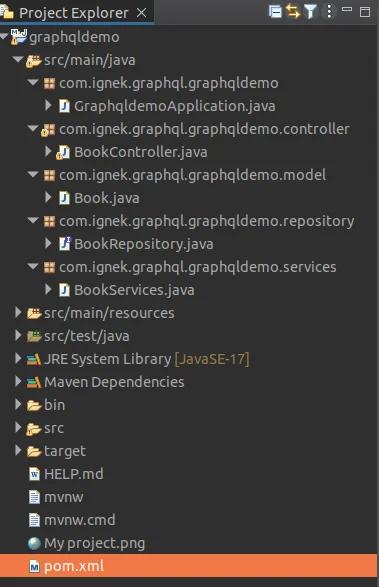
102}- Step 9:Here is the folder structure:
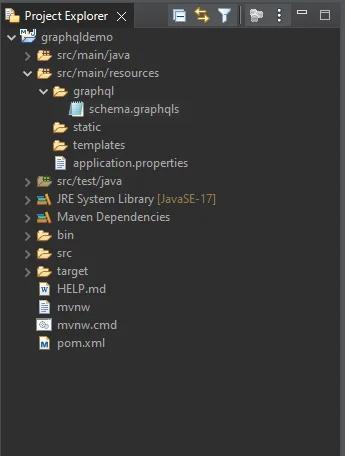
- Step 10: Go to the resources folder and create a graphql folder or if it already exists then don’t create it. Create one file into that folder name schema.graphqls.
- Step 11: Writing GraphQL query into the schema.graphqls file.
- The Query is to get or fetch the data and in type Book their data fields like id, title, desc, author, price, pages, and also have many more fields that you can have and with its datatypes. There is an id that has the ID datatype and “!” with an ID datatype that indicates the Not null. And there is also String and Int datatype for other fields.
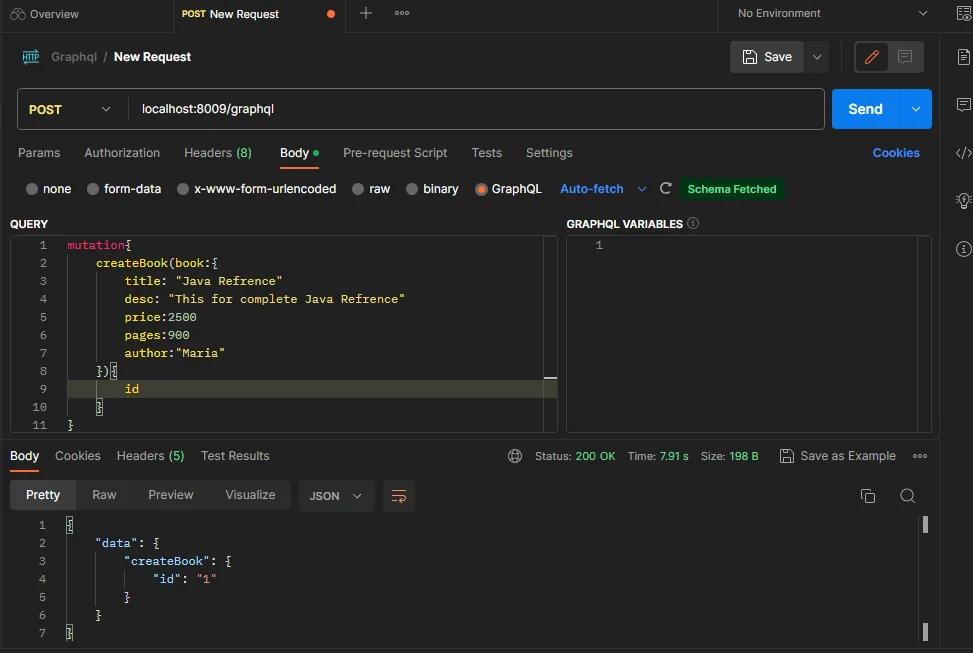
- Mutation is used to add or create the data and data will be inserted into the database.
1// schema.graphqls //
2type Mutation{
3	createBook(book:BookInput):Book
4}
5type Query{
6	allBooks:[Book]
7	getBook(id:Int):Book
8}
9type Book{
10
11	id:ID!
12	title:String
13	desc:String
14	author:String
15	price:Float
16	pages:Int
17}
18input BookInput{
19	title:String
20	desc:String
21	author:String
22	price:Float
23	pages:Int
24}- Step 12: Run the application and go to the MySQL workbench for checking if the database was created or not, if it is created then open the Postman for checking the API.
- When opening the postman, we have to add some data to the database so select the POST method and write the API and write only ”localhost:8009/graphql”.
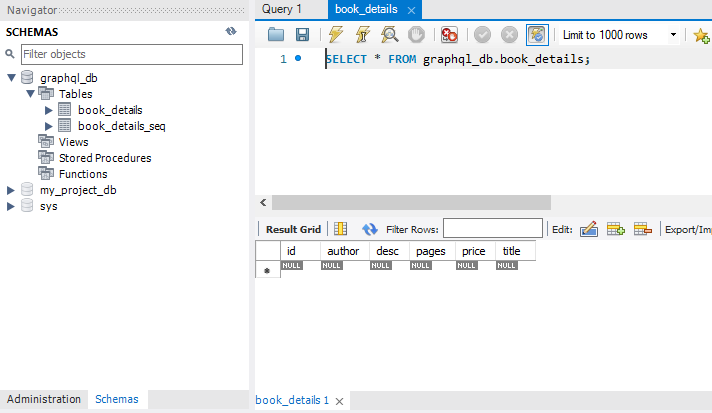
- Go to the MySQL workbench and check if the database was successfully created or not and after checking the database go to Postman and perform the POST operation.
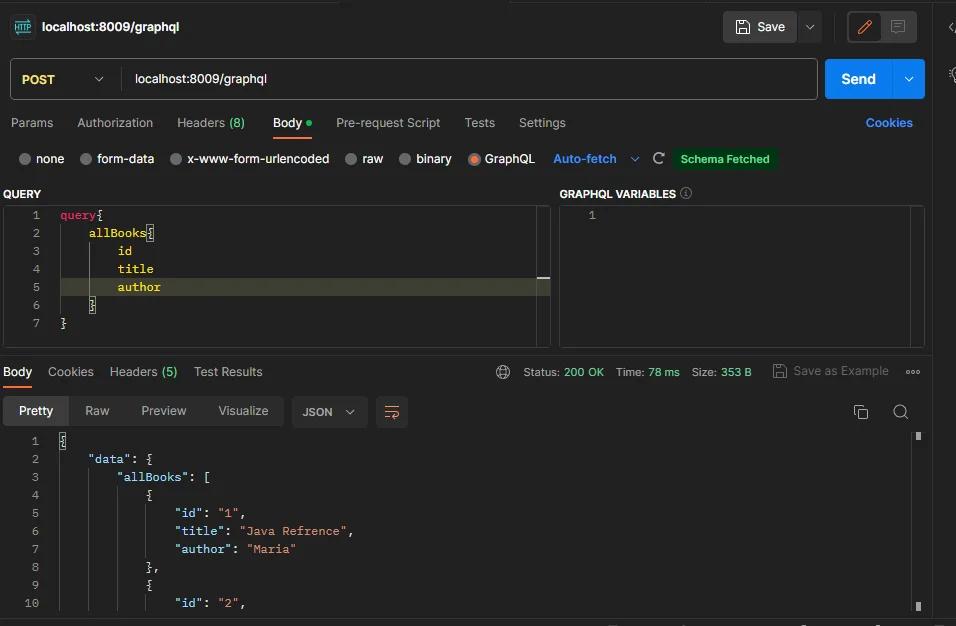
- Now getting all the book details based on the field,
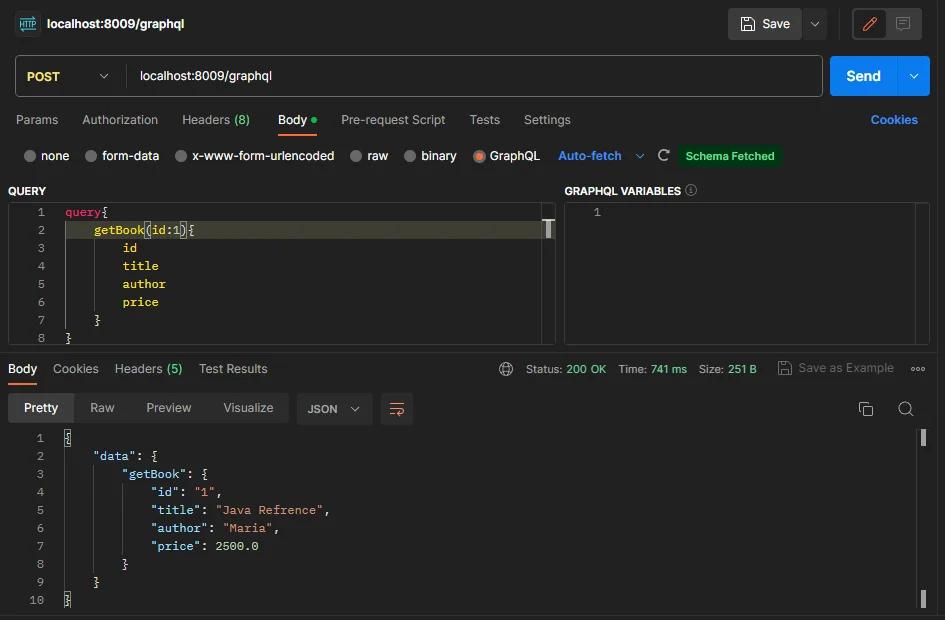
- Now getting the book record based on id,
We have covered GraphQL and its use case with the Spring Boot application. We also covered GraphQL schema types, queries, and mutations with examples. By using GraphQL the data is passed into the form of the query by using a single endpoint.


