Clustering in Liferay: Challenges and Use Cases

Introduction
Liferay DXP can scale to serve everything from the smallest to the largest websites. Out of the box, it’s configured optimally for a single server environment. If you expect high traffic or want to improve the overall fault tolerance of your site, consider clustering your DXP.
Dealing with high traffic, or do you want to increase the tolerance of the site? The solution is to use Cluster DXP.
Using more than one node can make the portal work better by spreading out the workload, speeding up data processing, and giving faster response times.
Clustering Terminology
Node
In the language of clustering, a node is a server. Whenever more than one node is running, it is a server cluster.
Master node
When clustering is performed, one node automatically becomes the master node. By default, the first node to start becomes the master node.
The master node does most of the work and runs all the background tasks. The nodes use the Jgroup library to talk to each other.
If the current master node fails, the cluster will automatically choose a new one, making sure that the system keeps running.
Database Cluster
As the name suggests, this cluster of databases combines several databases into one, which improves performance and reliability.
Load Balancer
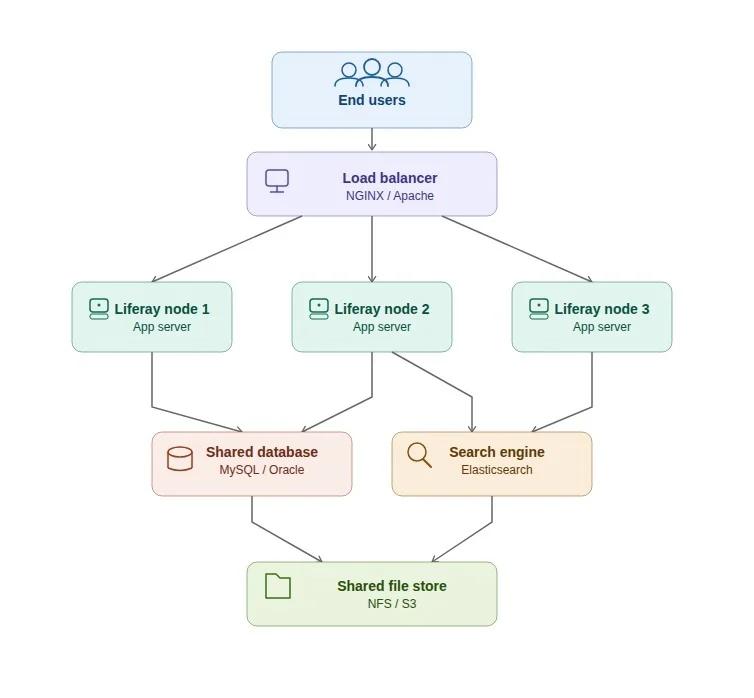
A load balancer makes sure that each request is being handled and that no node is overloaded by sending incoming requests to multiple servers.
Use Cases
- High Availability : If the server is up and running all the time with no down time, we can say that it is highly available. So, the High Availability is the ability of the system to stay available with no downtime, with almost 99.999% of uptime. This could be achieved through clustering, as if one node fails, the load balancer automatically routes the user to another server, and the application keeps on running smoothly.
- Scalability : Let's say, somehow, the traffic on a website is being increased. Now it needs to serve more users than it intended to. To serve all these users, clustering is introduced, ensuring that each request is served.
- Performance Improvement : Over time, the number of requests in a portal increases, and in order to serve all these requests, the server becomes slower. If a new server is introduced, it can increase the performance of the portal as the requests are now being served by multiple servers.
- Large Enterprise Portals : In the large applications, where multiple sites, organizations, and users are being served, using clustering becomes mandatory. Clustering allows multiple servers to serve thousands of users and access multiple sites at the same time.
Things to Keep in Mind
- Cluster link needs to be enabled in portal properties, i.e., portal-ext.properties: cluster.link.enabled=true
- Activation Keys need to be deployed on each node.
- All nodes should be pointing to the same Liferay database or database cluster.
- Documents and Media repositories are accessible to all nodes of the cluster.
- Search indexes are configured for replication or to use a separate search server.
- The caches should be distributed.
- The hot-deployed folders or configurations are added for each node if not using server farms.
Challenges
- Cache replication : Sometimes, caches are not replicated in all the nodes. If that is the case, do check the portal properties.
- Corrupt node : Sometimes, a node may experience data inconsistency due to misconfiguration or server errors. If that is the case, isolate the node from the node balancer and kill that node. A new node needs to be started with proper configuration and properties.
- Background job runs in the Master node : The master node needs to be tracked to track the process.
- 404 Issue for React Extension : The client extension needs to be rebuilt and redeployed if it is there.
- Manual Changes Appears in one node : We have found that any changes in objects and role permissions needs to be saved in each node, else it will not work. Use a client extension for creating objects.
Best Practices for Liferay DXP Clustering
- Keep all nodes synchronized : The nodes should be in sync, i.e., all the configurations, deployment artifacts, and database connections should be consistent across every node.
- Use a dedicated load balancer : As name suggests, using load balancing, traffic can be distributed efficiently and it reduces chances of failover.
- Monitor cluster health : The cluster health should be monitored regularly. It is necessary to keep the logs, system metrics and cluster status in check. It is recommended to use monitoring tools to detect issues at an early stage.
- Remove corrupt Nodes : Sometimes, a node may become corrupt, and may not work properly. In that case it needs to be removed from the cluster in order to prevent data inconsistency or service disruption.
- Automate deployments : It is recommended that the CI/CD pipelines should be used to deploy any changes.
- Regularly back up data : It is necessary to take frequent backups for database and document repositories, as they could be a life saver if crash recovery needs to be performed.
- Test failover scenarios : It could be helpful to simulate node failure periodically in a mirror environment to ensure that the cluster recovers as expected.
- Keep documentation updated : A proper detailed record of configuration changes, or properties could be helpful while troubleshooting the issue in the environment.
Common Pitfalls and Solutions
- Cache Inconsistency : If caches are not in sync, check the portal properties for the cluster cache settings and make sure distributed caching is turned on.
- Data Divergence : In a cluster, sometimes small changes are done manually and they are not reflected in other nodes. Any change even if it is very small, it should be performed through client extension or through automated scripts.
- Misconfigured Nodes : Check the configuration files for each node again, paying special attention to the settings for the database and cluster link.
- Master Node Failures : Keep an eye on which node is the master and be ready for automatic failover. Keep an eye on background jobs to make sure they don't run twice.
Conclusion
Liferay DXP's clustering makes a portal faster, more scalable, and more available. So, it is highly recommended for applications that are used by a lot of people or businesses. But for everything to work out, all the nodes need to be planned and set up correctly. Companies can make sure that their Liferay deployment is strong and flexible enough to meet their business needs by following best practices.


