Apache Kafka with Custom Objects in Spring Boot

Introduction
Apache kafka is an event streaming distributed system. Kafka handles the large amount of data in a latency manner so it’s the best choice for microservices architecture. Kafka is widely used for real time streaming based applications. Kafka is used in many applications like payments, finance, monitoring and managing assets, capturing the data form sensor and many more. In this blog I write about how to pass custom objects in apache kafka.
What is apache kafka
Apache kafka is an open source event streaming system that handles large amounts of real time data and manages messaging, storage and streaming processes. Apache kafka is a publisher-subscribe system. Multiple publishers send data to the kafka and that data is consumed to the multiple consumers by kafka. There are few key components of kafka you have understand that are,
- Producer : send message on kafka topic
- Consumer : Read message fro the kafka topic
- Broker : Kafka server that stores the data and client server request
- Cluster : Group of kafka broker that is work together to manage data
- Topic : The group of message that is categorized by uniques name
- Partitions : Topic is divided into partitions
- Offset : A unique integer value that represents the partitions
- Consumer Group : Group of consumers that share a common task.
- Zookeeper : Centralized services that managed all information and metadata.
What use custom Object is kafka
Apache kafka handles simple messages of string but in the real world we want to send data like json and another formatted or as a custom object. That’s why here we send customer objects to kafka as a real time application. A strict data type gives many errors in type checking so a custom object is a better way to use in type check and increases the readability of the code.
Prerequisites
- Java 17
- Maven
- Spring Boot Development Environment (here IntelliJ IDEA)
- Kafka
- Zookeeper
Steps to Integrate Kafka with Spring Boot Application
Step 1 : Add kafka dependency into your application.
1<dependency>
2			<groupId>org.springframework.kafka</groupId>
3			<artifactId>spring-kafka</artifactId>
4			<version>3.3.0</version>
5		</dependency>
Step 2 : Configure Application Properties
Add the kafka properties into the application.properties:
1spring.kafka.bootstrap-servers=localhost:9092
2spring.kafka.consumer.group-id=group_id
3spring.kafka.consumer.auto-offset-reset=earliest
4spring.kafka.producer.key-serializer=org.apache.kafka.common.serialization.StringSerializer
5spring.kafka.producer.value-serializer=org.springframework.kafka.support.serializer.JsonSerializer
6spring.kafka.consumer.value-deserializer=org.springframework.kafka.support.serializer.JsonDeserializer
7spring.kafka.consumer.properties.spring.json.trusted.packages=*
Here group_id is a consumer group name you can choose any meaningful name here.
Step 3 : Define a custom object.
Create a class for defining a custom object.
1public class User {
2    private String id;
3    private String name;
4    private String email;
5
6    // Getters and setters
7    public String getId() {
8        return id;
9    }
10
11    public void setId(String id) {
12        this.id = id;
13    }
14
15    public String getName() {
16        return name;
17    }
18
19    public void setName(String name) {
20        this.name = name;
21    }
22
23    public String getEmail() {
24        return email;
25    }
26
27    public void setEmail(String email) {
28        this.email = email;
29    }
30
31    @Override
32    public String toString() {
33        return "User{" +
34                "id='" + id + '\'' +
35                ", name='" + name + '\'' +
36                ", email='" + email + '\'' +
37                '}';
38    }
39}
Step 4 : Create a services for define a kafka producer
Create a producer that sends custom objects to the kafka topic.
1import org.springframework.beans.factory.annotation.Autowired;
2import org.springframework.kafka.core.KafkaTemplate;
3import org.springframework.stereotype.Service;
4
5@Service
6public class UserProducer {
7
8    private static final String TOPIC = "users";
9
10    @Autowired
11    private KafkaTemplate<String, User> kafkaTemplate;
12
13    public void sendMessage(User user) {
14        kafkaTemplate.send(TOPIC, user);
15    }
16}
Step 5 : Create a services for define a kafka consumer
Create a consumer that reads messages to the kafka topic.
1import org.springframework.kafka.annotation.KafkaListener;
2
3public class UserConsumer {
4
5    @KafkaListener(topics = "users", groupId = "group_id")
6    public void consume(User user) {
7        System.out.println("Consumed message: " + user);
8    }
9}
Step 6 : define controller
Define the endpoint in the controller that will test the producer.
1import org.springframework.beans.factory.annotation.Autowired;
2import org.springframework.http.ResponseEntity;
3import org.springframework.web.bind.annotation.*;
4
5@RestController
6@RequestMapping("/api")
7public class Controller {
8
9        @Autowired
10        private UserProducer userProducer;
11
12    @PostMapping("/publish")
13    public String sendMessage(@RequestBody User user) {
14        userProducer.sendMessage(user);
15        return "Message published successfully!";
16    }
17}
Step 7 : Run the Application and kafka
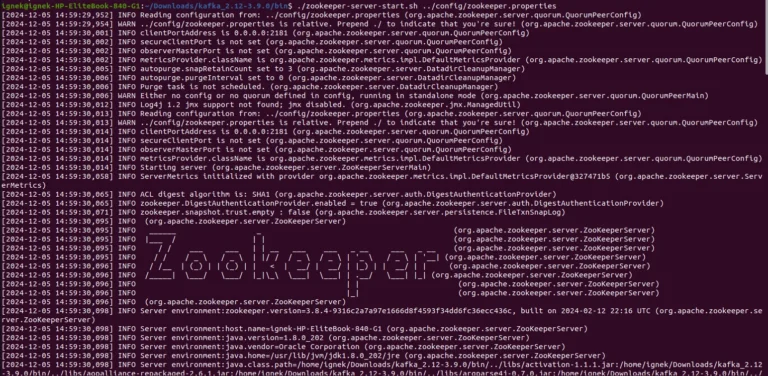
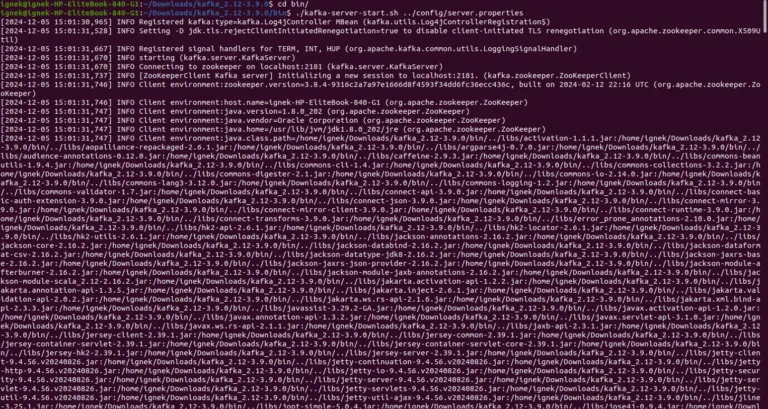
Start the kafka server by downloading the kafka and run the zookeeper-server-start.sh and kafka-server-start.sh script.
Step 8 : Test the Producer Using the API with tools like postmen
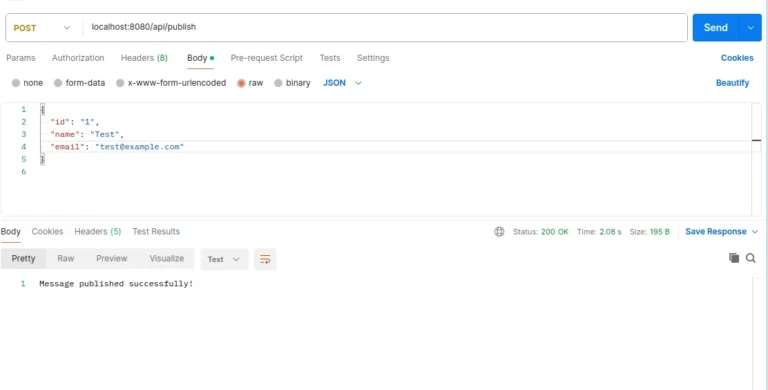
Here I test the endpoint using postmen.
Step 9 : For check the consumer see logs

Conclusion
You can incorporate a custom object with Kafka into your Springboot application to improve the flexibility and efficiency of your application. The above step-by-step procedure makes it simple to integrate custom objects in Kafka.For managing data and interacting with other microservices, this is highly helpful in microservices.Kafka can be used for a variety of tasks, including asset management, data handling using sensors, and payment processing.


