Implementing backend pagination with Material-UI in React

Introduction
Pagination is essential when handling large datasets in a web application. Instead of loading all records at once, backend pagination retrieves data in smaller chunks, improving performance and user experience. In this guide, we will implement backend pagination in a React blog using Material-UI’s Pagination component.
We will build a simple React frontend that fetches paginated blog posts from a backend API and displays them using Material-UI components.
Prerequisites
- Node.js and npm
- React
- Typescript
- Material UI
Frontend Setup in React
Let’s create a React app using the following command:
1//Create a react app using the following command
2npm create vite@latest pagination --template react-ts
3cd  pagination
4npm install
5//Install the Material UI library
6npm install @mui/material @emotion/react @emotion/styled
7
8//Install the axios
9npm install axios
10
11//Command for run the React project
12npm run dev
Frontend Implementation (React + Material-UI)
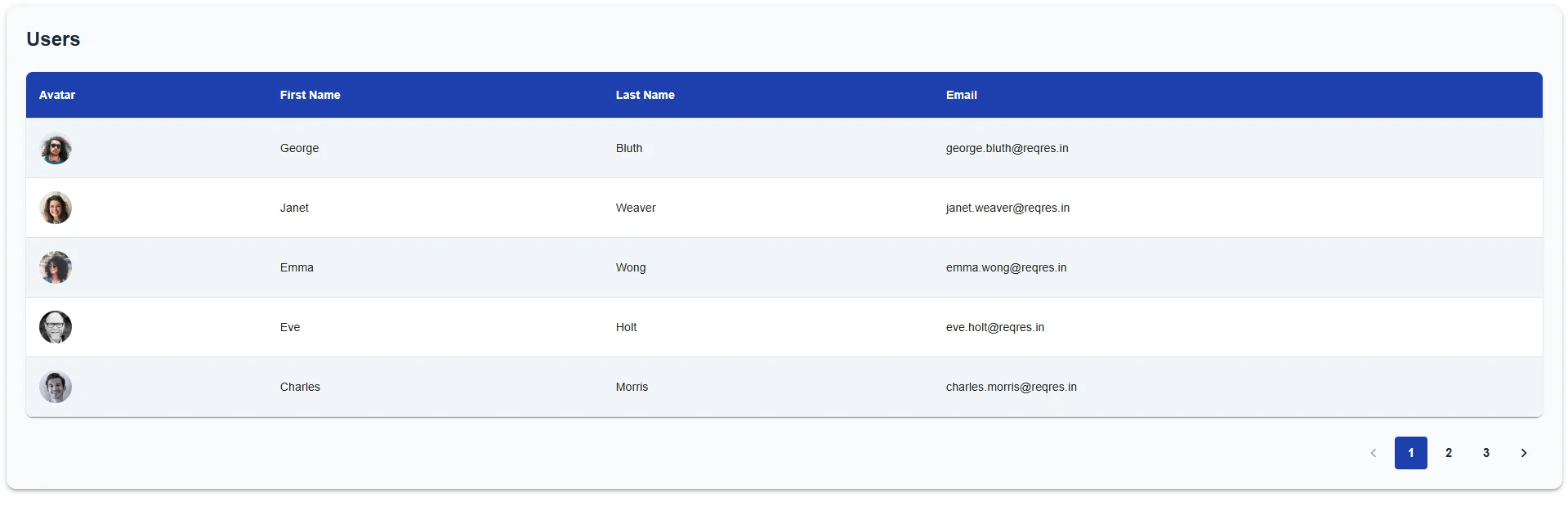
Below example demonstrates how to build a user listing page with pagination in React using Material-UI components. The app fetches user data from the public ReqRes API and displays it in a stylish table format with user avatars, names, and emails. Users can easily navigate between pages using the pagination controls at the bottom of the table.
Put the below code into the App.tsx File.
1//App.tsx
2import React, { useEffect, useState } from "react";
3import axios from "axios";
4import { Table, TableBody,  TableCell, TableContainer,  TableHead, TableRow, Paper, Avatar,Pagination,
5  CircularProgress,Box,Typography} from "@mui/material";
6
7interface User {
8  id: number;
9  email: string;
10  first_name: string;
11  last_name: string;
12  avatar: string;
13}
14
15interface ApiResponse {
16  page: number;
17  per_page: number;
18  total: number;
19  total_pages: number;
20  data: User[];
21}
22
23const App = () => {
24  const [users, setUsers] = useState<User[]>([]);
25  const [page, setPage] = useState<number>(1);
26  const [totalPages, setTotalPages] = useState<number>(1);
27  const [loading, setLoading] = useState<boolean>(false);
28
29  const fetchUsers = async (currentPage: number) => {
30    setLoading(true);
31    try {
32      const response = await axios.get<ApiResponse>(
33        `https://reqres.in/api/users?page=${currentPage}&per_page=5`
34      );
35      setUsers(response.data.data);
36      setPage(response.data.page);
37      setTotalPages(response.data.total_pages);
38    } catch (error) {
39      console.error("Failed to fetch users:", error);
40    } finally {
41      setLoading(false);
42    }
43  };
44
45  useEffect(() => {
46    fetchUsers(page);
47  }, [page]);
48
49  const handlePageChange = (
50    event: React.ChangeEvent<unknown>,
51    value: number
52  ) => {
53    setPage(value);
54  };
55
56  return (
57    <Paper
58      elevation={3}
59      sx={{ padding: 3, backgroundColor: "#f9fafb",  borderRadius: 3, }}
60    >
61      <Typography
62        variant="h5"
63        sx={{ marginBottom: 3, fontWeight: "bold", color: "#1e293b" }}
64      >
65        Users
66      </Typography>
67      {loading ? (
68        <Box display="flex" justifyContent="center" my={5}>
69          <CircularProgress color="primary" />
70        </Box>
71      ) : (
72        <TableContainer component={Paper} sx={{ borderRadius: 2 }}>
73          <Table>
74            <TableHead>
75              <TableRow sx={{ backgroundColor: "#1e40af" }}>
76                <TableCell sx={{ color: "#fff", fontWeight: "bold" }}>
77                  Avatar
78                </TableCell>
79                <TableCell sx={{ color: "#fff", fontWeight: "bold" }}>
80                  First Name
81                </TableCell>
82                <TableCell sx={{ color: "#fff", fontWeight: "bold" }}>
83                  Last Name
84                </TableCell>
85                <TableCell sx={{ color: "#fff", fontWeight: "bold" }}>
86                  Email
87                </TableCell>
88              </TableRow>
89            </TableHead>
90            <TableBody>
91              {users.map((user) => (
92                <TableRow
93                  key={user.id}
94                  sx={{
95                    "&:nth-of-type(odd)": { backgroundColor: "#f1f5f9" },
96                    "&:hover": { backgroundColor: "#e2e8f0" },
97                  }}
98                >
99                  <TableCell>
100                    <Avatar src={user.avatar} alt={user.first_name} />
101                  </TableCell>
102                  <TableCell>{user.first_name}</TableCell>
103                  <TableCell>{user.last_name}</TableCell>
104                  <TableCell>{user.email}</TableCell>
105                </TableRow>
106              ))}
107            </TableBody>
108          </Table>
109        </TableContainer>
110      )}
111
112      <Pagination
113        count={totalPages}
114        page={page}
115        onChange={handlePageChange}
116        color="primary"
117        shape="rounded"
118        size="large"
119        sx={{
120          marginTop: 3,
121          display: "flex",
122          justifyContent: "flex-end",
123          "& .MuiPaginationItem-root": {
124            fontWeight: "bold", color: "#1e293b",
125            "&.Mui-selected": {
126              backgroundColor: "#1e40af",
127              color: "#fff",
128            },
129          },
130        }}
131      />
132    </Paper>
133  );
134}
135export default App
With the above code, you will get the following output on your screen.
Conclusion:
Pagination helps effectively handle and present big sets of data by breaking them into pieces of small and manageable size. In the project, we have been able to implement server-side pagination based on the Reqres API through which we are able to get the user information depending on the page chosen dynamically. Pagination not only assists in enhancing the performance of the application by minimizing the quantity of data rendered simultaneously but also gives users more control over going through data. This mechanism is especially applicable to APIs that do support paginated responses as it minimizes unnecessary fetching of data and optimizes bandwidth utilization.


