Data visualization in React : integrating Victory Chart for stunning visuals

Introduction
Data visualization is a crucial aspect of modern web applications,enabling users to understand complex datasets through interactive and engaging charts. Visual representation of data is essential for understanding patterns, trends, and insights. Whether you’re developing a dashboard, financial application, or analytics tool, effective data visualization helps users interpret complex information quickly and intuitively.
In React, several libraries are available for charting . But Victory Chart is a powerful and flexible charting library designed specifically for React applications. Victory simplifies data visualization by providing a declarative, component-based API that makes creating stunning and interactive charts easy.
Prerequisites
- Node.js and npm
- React
- Typescript
Why Use Victory?
Victory is a popular and powerful charting library in React. It helps developers create interactive and customizable charts. It also provides many components like VictoryPie, VictoryBar, VictoryChart, and more, which can be easily customized and animated.
Frontend Setup in React
Let’s create a React app using the following command:
1//Create a react app using the following command
2
3npx create-react-app victory-chart --template typescript
4cd  victory-chart
5
6//Install the victory library
7
8npm install victory
9
10//Command for run the React project
11
12npm run dev
Graph with Custom Data
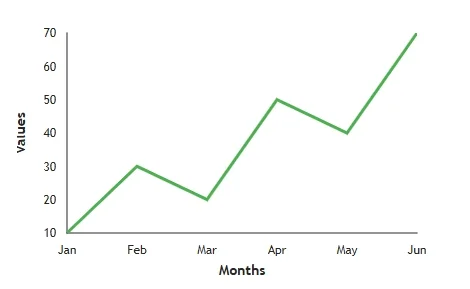
In Victory Charts, you can create a custom chart with your data and specify axis names using VictoryChart, VictoryAxis, and VictoryLine (or other chart components like VictoryBar, VictoryScatter, etc.).
Here’s a basic example of a Victory line chart with custom data and axis labels:
1//App.tsx
2
3import ' ./App.css '
4import {  VictoryAxis ,  VictoryChart ,  VictoryLine } from 'victory'
5
6function App() {
7  const data = [
8    { x: "Jan", y: 10 },
9    { x: "Feb", y: 30 },
10    { x: "Mar", y: 20 },
11    { x: "Apr", y: 50 },
12    { x: "May", y: 40 },
13    { x: "Jun", y: 70 },
14  ];
15  return (
16    <>
17      <div>
18        <VictoryChart>
19          {/* X-Axis */}
20          <VictoryAxis
21            label="Months"
22            style={{
23              axisLabel: { padding:”30px”, fontSize: “15px”, fontWeight: "bold" },
24              tickLabels: { fontSize: “13px” }
25            }}
26          />
27
28          {/* Y-Axis */}
29          <VictoryAxis
30            dependentAxis
31            label="Values"
32            style={{
33              axisLabel: { padding: “40px”, fontSize:”15px”, fontWeight: "bold" },
34              tickLabels: { fontSize: “12px” }
35            }}
36          />
37
38          {/* Line Chart */}
39          <VictoryLine
40            data={data}
41            style={{ data: { stroke: "#4caf50", strokeWidth: 3 } }}
42          />
43        </VictoryChart>
44      </div>
45    </>
46  )
47}
48
49export default App
With the above code, you will get the following line chart on your page
Styling Graph
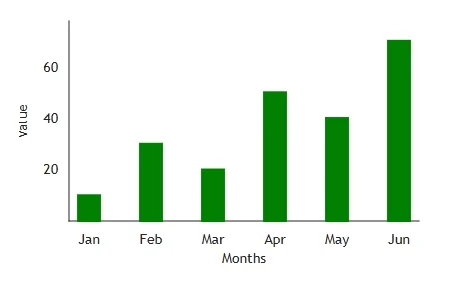
Victory Charts provide powerful customization options for styling graphs.So you can modify various elements like lines, bars, axes, labels, grid lines, tooltips, and backgrounds to enhance the appearance of your chart.
1//App.tsx
2
3import ' ./App.css '
4import { VictoryAxis , VictoryBar , VictoryChart } from 'victory'
5
6function App() {
7  const data = [
8    { x: "Jan", y: 10 },
9    { x: "Feb", y: 30 },
10    { x: "Mar", y: 20 },
11    { x: "Apr", y: 50 },
12    { x: "May", y: 40 },
13    { x: "Jun", y: 70 },
14  ];
15  return (
16    <div>
17      <VictoryChart domainPadding={20}>
18        {/* X-Axis */}
19        <VictoryAxis
20          label="Months"
21          style={{ axisLabel: { padding: “30px”, fontSize:”14px” } }}
22        />
23
24        {/* Y-Axis */}
25        <VictoryAxis
26          dependentAxis
27          label="Value"
28          style={{ axisLabel: { padding: “40px”, fontSize: “14px” } }} />
29
30        {/* Line Chart */}
31        <VictoryBar
32          data={data}
33          style={{ data: { strokeWidth: 2, fill: "green" } }}
34        />
35      </VictoryChart>
36    </div>
37  )
38}
39
40export default App
With the above code, you will get the following bar chart on your page
Conclusion
Victory Charts provides a flexible ,powerful ,and easy-to-use library for building data visualizations in React applications. With built-in components like VictoryLine, VictoryBar, and VictoryPie, developers can create a wide range of charts with minimal effort. Victory is ideal for developers who want to create visually appealing and dynamic charts without complex configurations. Whether for simple or advanced visualizations, Victory provides all the necessary tools to create high-quality charts efficiently.


